
Introduction
Automated branding strategies changed everything for one of my clients — a fast-growing SaaS startup that was invisible online despite having an excellent product.
Their branding was all over the place. Different logo versions on different platforms. Email campaigns that went out whenever someone remembered to send them. Social media posts that were inconsistent in tone, visuals, and timing. Their sales team was using pitch decks with three different color schemes — in the same week.
The brand looked amateur. And in 2026, an amateur-looking brand loses customers before the first conversation even starts.
We rebuilt their entire branding system using automation. Not expensive enterprise software. Not a team of 10 designers. Just smart, connected tools with clear brand rules baked in.
Within 90 days, their brand was consistent across every channel. Content was going out daily on schedule. Their design team stopped wasting hours on repetitive tasks. And their inbound leads increased by 38% — because the brand finally looked like a company people could trust.
That is what automated branding strategies actually deliver. Not just a prettier logo. A system that makes your brand work for you — consistently, at scale, without manual babysitting.
Key Takeaways
- Automated branding uses AI and smart workflows to maintain brand consistency without manual oversight at every step
- Brands using automation report significant increases in qualified leads, sales productivity, and conversion rates, outperforming competitors
- Businesses using AI systems reduced production costs by up to 42% while increasing content output significantly without adding headcount
- Automation does not replace brand strategy — it executes your strategy consistently at scale
- Build your brand rules first, then automate them — tools without rules create consistent garbage
- More than 70% of businesses already deploy generative AI in marketing workflows, from content generation to personalization
What Is Automated Branding?
Most people think branding is a one-time creative project. Pick your colors. Design your logo. Write some guidelines. Put them in a PDF nobody reads.
That approach breaks down the moment you have more than two people creating content or more than two channels to manage.
Automated branding is different. It is the ongoing, systematic use of AI, software, and intelligent workflows to maintain, produce, and distribute brand-consistent content — without needing a human to manually check every single output.
The modern branding stack in 2026 is heavily powered by AI tools that streamline both creative and strategic processes. These tools are not replacing creativity — they are amplifying it.
The key distinction most guides miss: automated branding is not just about creating content faster. It is about making sure every piece of content — whether created by your CEO, your intern, or your AI tool — looks, sounds, and feels like it came from the same brand.
Why Automated Branding Matters More in 2026
Five years ago, a brand had to stay consistent across maybe four or five channels. Website, Facebook, email, maybe a brochure.
Today, the average mid-size business manages content across 12 to 18 channels simultaneously. LinkedIn, Instagram, TikTok, YouTube, email newsletters, SMS campaigns, Google Ads, display ads, podcast appearances, webinars, partner co-marketing, and more.
Maintaining brand consistency manually across all of these is not just difficult — it is mathematically impossible without a system.
Here is what brand inconsistency actually costs you:
Lost trust: Research consistently shows that brand consistency increases revenue by an average of 23%. Every time a customer sees a mismatched logo or an off-tone social post, a small piece of trust erodes.
Wasted design time: Without automation, designers spend 60 to 70% of their time on repetitive resizing, reformatting, and template work — instead of actual creative work.
Slower campaign launches: Manual review and approval processes add days or weeks to every campaign. Automation compresses that to hours.
Broken attribution: When your brand looks different everywhere, customers do not connect your ad to your website to your email. Your retargeting breaks. Your funnel leaks.
The 8 Core Automated Branding Strategies
Strategy 1: Automate Your Brand Asset Management
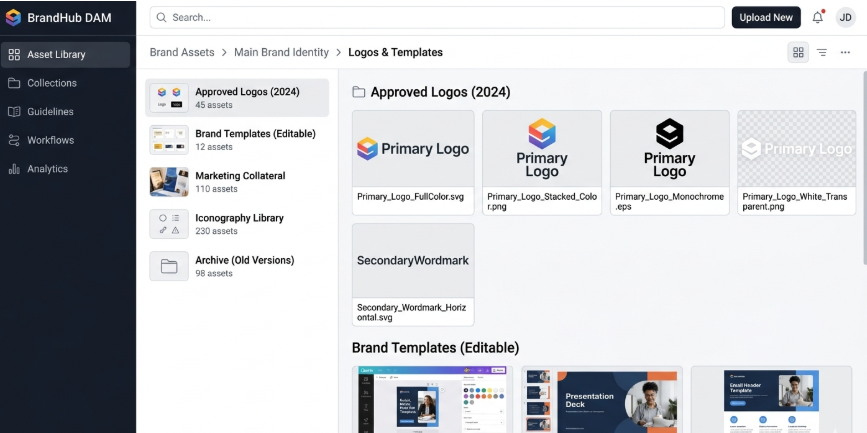
The foundation of automated branding is having one central place where all your brand assets live — and making sure everyone pulls from that one place, automatically.
This is called a Digital Asset Management system, or DAM.
Without a DAM, your team is emailing logo files, downloading images from random Google Drive folders, and using outdated versions of assets without realizing it. Every piece of content becomes a branding lottery.
With a DAM connected to your design tools, your social scheduler, and your content platforms, the right asset is always available in the right format — automatically.
What to automate:
- Logo files in all formats and approved color variations
- Brand photography and approved stock image libraries
- Font files and usage guidelines
- Color palette files with exact hex, RGB, and CMYK codes
- Approved templates for every content type
Tools for this:
- Bynder — enterprise DAM with AI-powered asset tagging
- Brandfolder — mid-market, excellent Canva integration
- Frontify — brand management plus DAM in one platform
- Google Drive with strict folder structure — free option for small teams
Strategy 2: Automate Social Media Content and Scheduling
Social media is where most brand inconsistency lives — because it is the channel with the highest volume and the most contributors.
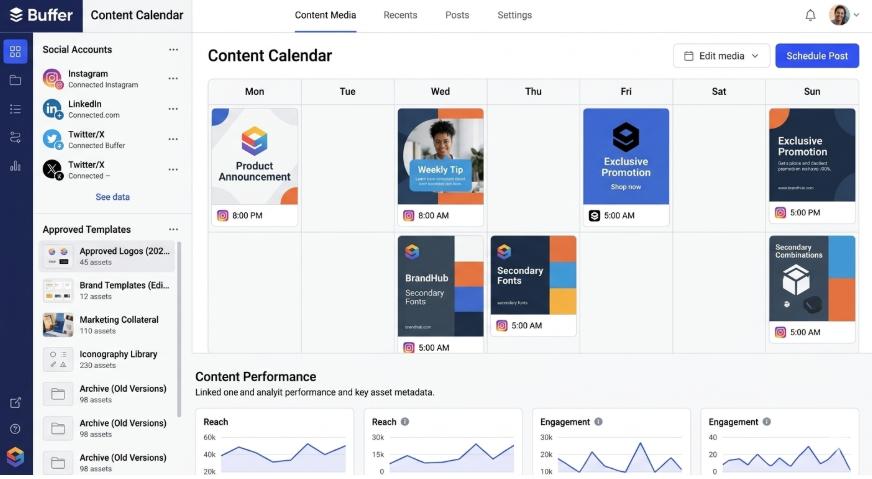
An automated social media system solves three problems at once: it maintains visual consistency through brand templates, ensures content goes out on the optimal schedule, and frees your team from the daily grind of manual posting.
What to automate:
- Content scheduling across all platforms from one dashboard
- Image resizing and formatting for each platform’s specifications
- Brand template application so every post matches your visual identity
- Hashtag sets and caption templates for recurring content types
- Approval workflows so content is reviewed before it goes live
Tools for this:
- Buffer — clean, simple scheduling with team approval workflows
- Later — strong visual content calendar, especially for Instagram
- Hootsuite — broader enterprise scheduling and analytics
- Canva Pro with scheduling — design and publish from one tool
Expert Tip: Build a library of 20 to 30 approved Canva templates for your most common social post types — product announcements, quotes, tips, and promotions. When every piece of content starts from an approved template, brand consistency becomes the default — not the exception.
Strategy 3: Automate Brand Voice with AI Content Tools
Visual consistency is only half of brand identity. The other half is voice — how your brand sounds in every piece of written content.
In 2026, AI content tools have become genuinely good at maintaining consistent brand voice at scale. The key is not just using an AI tool — it is training that tool on your specific brand voice guidelines, existing approved content, and target audience.
Copywriting tools generate tone-consistent messaging tailored to specific audience segments, significantly reducing content production time.
What to automate:
- Blog post drafts that match your established content style
- Social media captions across all platforms
- Email subject lines and body copy
- Ad headline and description variations
- Product descriptions at scale
Tools for this:
- Jasper AI — strong brand voice training, team collaboration features
- Writer.com — specifically designed for brand voice enforcement across teams
- Copy.ai — fast content generation with brand tone settings
- HubSpot AI — integrated with CRM for personalized brand communications
How to set it up properly:
Do not just install the tool and start generating. Spend two hours upfront:
- Write out your brand voice in clear terms — three to five adjectives that describe your tone
- Upload five to ten examples of your best existing content
- Write down what your brand voice is NOT — words, phrases, and tones to avoid
- Test the tool with 10 sample prompts before using it for real content
- Build an approval step before any AI content goes live
Strategy 4: Automate Email Marketing with Brand Consistency
Email is still the highest-ROI marketing channel in 2026. But most brands treat their email campaigns as individual one-off projects instead of a branded, automated system.
An automated email branding system means every email — welcome series, promotional campaigns, abandoned cart, post-purchase, win-back — looks like it came from the same brand and reaches the right person at the right time without manual intervention.
What to automate:
- Welcome series for new subscribers — triggered immediately on signup
- Abandoned cart sequences — triggered within one hour of abandonment
- Post-purchase follow-up — triggered after confirmed delivery
- Re-engagement campaigns — triggered after 60 to 90 days of inactivity
- Birthday and anniversary emails — triggered by stored customer data
Tools for this:
- Klaviyo — best-in-class for e-commerce email automation
- HubSpot — strong for B2B lead nurturing workflows
- ActiveCampaign — excellent automation depth at mid-market pricing
- Mailchimp — good starting point for small businesses
Key brand consistency rules for email:
- Use only approved email templates with locked header and footer elements
- Maintain the same brand color, font, and logo placement in every email
- Set brand voice guidelines in your AI writing tool before generating email copy
- Test every email on mobile — over 60% of emails are opened on mobile in 2026
Strategy 5: Automate Brand Monitoring and Reputation Management
You cannot protect a brand you cannot see. Brand monitoring automation watches every corner of the internet for mentions of your brand — and alerts you before small problems become big crises.
Automated monitoring tools scan social platforms and digital spaces for brand mentions. When paired with AI, they can alert teams to sentiment shifts or emerging issues. This proactive approach minimizes reputation risk and accelerates response actions.
What to automate:
- Brand name mentions across social media, news, and review sites
- Competitor mention tracking
- Sentiment analysis — positive, negative, or neutral classification
- Review notifications from Google, Trustpilot, G2, and Yelp
- Unauthorized logo or trademark usage detection
Tools for this:
- Brand24 — excellent real-time mention monitoring with sentiment scoring
- Mention.com — clean interface, good for small to mid-size teams
- Brandwatch — enterprise-level brand intelligence platform
- Google Alerts — free, basic, but still useful for brand name monitoring
Expert Tip: Set up alerts for common misspellings of your brand name — not just the correct spelling. Customers frequently search and mention brands with typos. Missing those mentions means missing feedback and reputation signals you need to see.
Strategy 6: Automate Brand Compliance Across Teams
As brands grow, the biggest threat to brand consistency is not competitors — it is internal teams creating off-brand content without realizing it.
The sales team makes their own one-pagers. The regional offices design their own social graphics. The customer support team writes their own email templates. None of them match.
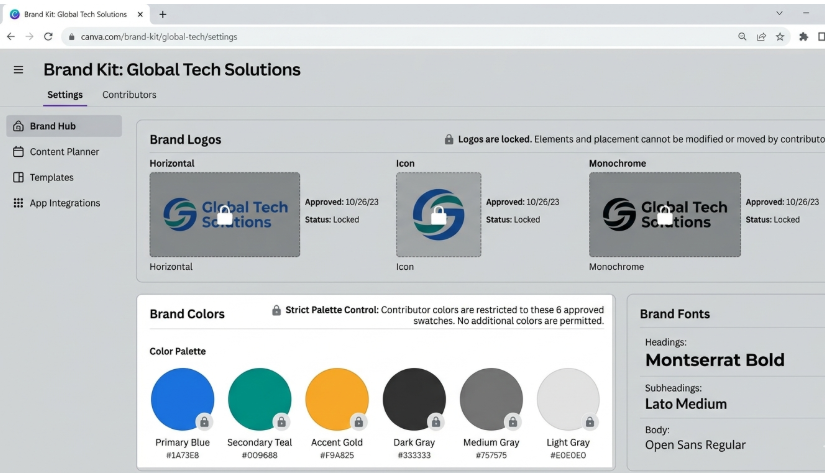
Brand compliance automation solves this by embedding brand rules directly into the tools your team already uses — so it is impossible to create off-brand content, not just discouraged.
Brand compliance in 2026 is not a static checklist. It is a set of rules embedded into automation and workflow tools that guard the use of trademarks and brand elements, accuracy of claims and legal compliance, and accessibility and platform-specific policy adherence. Modern compliance engines check assets automatically against brand and legal standards, reducing risk and ensuring consistency.
What to automate:
- Locked brand templates in Canva or Marq that non-designers can customize within brand rules
- Automated content approval workflows before anything goes live
- Brand guideline enforcement in AI writing tools
- Legal disclaimer and trademark symbol placement checks
Tools for this:
- Marq — best-in-class for brand template governance across distributed teams
- Canva for Teams — brand kit with locked elements that contributors cannot change
- Frontify — brand guidelines portal with asset management integrated
- Templafy — enterprise document branding for Office and Google Workspace
Strategy 7: Automate Paid Advertising Creative
Ad creative is one of the most time-consuming and expensive parts of brand management. Most brands create dozens of ad variations manually for every campaign — different sizes, different platforms, different audience segments.
Creative automation changes this entirely. You create the master creative once. The automation system adapts it to every required format, size, and platform variation automatically — while maintaining brand consistency throughout.
Platforms like Meta are building fully automated advertising systems that generate and optimize ad creative and targeting. This illustrates how platforms themselves are betting on AI to drive scalability and personalization for brands.
What to automate:
- Ad resizing across all platform specifications from one master design
- Dynamic creative optimization — automatically testing headline and image combinations
- Audience-specific messaging variations at scale
- Performance-based creative rotation — automatically prioritizing best performers
Tools for this:
- Celtra — professional creative automation for enterprise ad teams
- Smartly.io — social ad creative automation with performance optimization
- Canva Pro — batch export in multiple sizes from one template
- Meta Advantage+ — AI-powered ad creative and targeting automation within Meta
Strategy 8: Automate Brand Analytics and Reporting
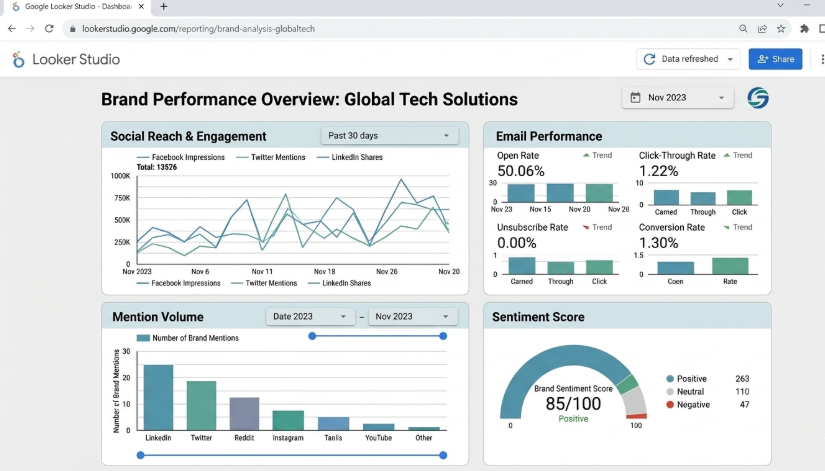
You cannot improve what you cannot measure. Brand analytics automation gives you a continuous, real-time picture of how your brand is performing — without manually pulling reports from 10 different platforms every Monday morning.
What to automate:
- Weekly brand performance dashboards pulling data from all platforms
- Social media engagement and reach reporting
- Email open rate, click rate, and conversion tracking
- Brand mention volume and sentiment trends
- Competitor brand share of voice monitoring
Tools for this:
- HubSpot Marketing Hub — all-in-one brand and marketing analytics
- Google Looker Studio — free, connects all data sources into one dashboard
- Sprout Social — social-specific analytics with competitor benchmarking
- Triple Whale — best for e-commerce brands running paid ads
Comparison Table: Automated Branding Tools by Category
| Category | Best Tool | Free Plan | Starting Price | Best For |
|---|---|---|---|---|
| Asset Management | Brandfolder | No | $Custom | Mid to enterprise |
| Social Scheduling | Buffer | Yes | $6/month | All team sizes |
| AI Content/Voice | Jasper AI | No | $39/month | Content teams |
| Email Automation | Klaviyo | Yes | $20/month | E-commerce brands |
| Brand Monitoring | Brand24 | No | $99/month | Growing brands |
| Brand Compliance | Canva for Teams | No | $30/month | Distributed teams |
| Ad Creative | Smartly.io | No | Custom pricing | Paid ad teams |
| Analytics | Looker Studio | Yes | Free | All businesses |
How to Build Your Automated Branding System: Step by Step
Step 1: Document your brand rules first Before touching any tool, write down your brand guidelines. Logo usage rules. Exact color codes. Font names. Tone of voice in three to five adjectives. This document is the foundation everything else is built on. Automating without it means consistently producing the wrong thing.
Step 2: Audit what you currently have List every channel you publish on. Every tool your team uses to create content. Every person who creates brand content. This audit reveals where the gaps and inconsistencies are hiding.
Step 3: Start with your highest-volume channel Do not try to automate everything at once. Find the channel where your team creates the most content — usually social media or email — and automate that first. Build confidence and process before expanding.
Step 4: Build your template library Create approved templates for your 10 most common content types. Social posts, email headers, blog featured images, ad creatives, presentation slides. These templates are the single biggest lever for brand consistency.
Step 5: Connect your tools Use Zapier or Make (formerly Integromat) to connect your tools so they share data automatically. New blog post published → automatically resize and schedule social promotion. New customer in CRM → automatically trigger branded welcome email series.
Step 6: Set up brand monitoring Install at least one brand monitoring tool before you need it. You want to be watching before a crisis, not scrambling to set up alerts after one.
Step 7: Review and optimize monthly Automation is not set-and-forget. Review your brand performance metrics monthly. Check that automated content still sounds and looks on-brand. Update templates when your brand evolves.
Pros and Cons of Automated Branding
Pros
- Consistent brand presentation across every channel without manual checking
- Massive time savings — teams report 40 to 60% reduction in repetitive design and content tasks
- Faster campaign launches — days compressed to hours
- Scalable — the same system works whether you have 2 team members or 200
- Data-driven — automation generates performance data that manual processes cannot
- Lower long-term costs — less reliance on freelancers for repetitive content tasks
Cons
- Upfront time investment to set up properly — shortcuts here create problems later
- Risk of over-automation — brands that automate too much lose the human touch that builds real connection
- Tool costs add up — a full automation stack can run $300 to $1,000 per month for growing teams
- Requires regular maintenance — brand guidelines change, tools update, workflows break
- Wrong rules automated at scale — if your brand guidelines are weak, automation makes the weakness consistent and very visible
Common Mistakes in Automated Branding
Mistake 1: Automating before defining brand rules This is the number one mistake. If your brand guidelines are vague or incomplete, automation just produces vague and inconsistent content faster. Define the rules precisely before building the system.
Mistake 2: Choosing tools before understanding the problem Most businesses buy tools because they saw them in an ad or a competitor was using them. Start with your specific problem — inconsistent social visuals, off-brand emails, slow campaign approvals — and choose the tool that solves that specific problem.
Mistake 3: Removing human judgment entirely Maintaining human oversight in creative direction is critically important. AI is changing branding workflows in a way that blends creativity with automation, making branding both faster and more intelligent without losing human direction. Automation handles volume and consistency. Humans handle strategy and creative judgment.
Mistake 4: Never updating automated workflows Your brand evolves. Your audience evolves. Your market evolves. Automated workflows built 18 months ago may be producing content that no longer matches who you are. Review every automated workflow quarterly.
Mistake 5: Investing in tools but not the team Brands that invest in the tools but not the team fail to get results. Someone needs to own the brand automation system — maintaining it, updating it, and training new team members on how to use it.
Expert Tips
Tip 1: Your brand template library is your highest-ROI automation investment. Before subscribing to any expensive tool, build 10 locked Canva templates for your most common content types. This single action solves 50% of brand consistency problems immediately.
Tip 2: Use a workflow tool like Zapier or Make to connect your existing tools before buying new ones. Most teams have powerful tools that are not talking to each other. Connection often beats addition.
Tip 3: Build an approval step into every automated workflow that produces public-facing content. Automation speeds up creation — the approval step catches the 5% that still needs human review before it goes live.
Tip 4: Train your AI content tools with rejection examples — not just approval examples. Showing the tool what your brand does NOT sound like is just as important as showing it what you do sound like.
Tip 5: Audit your brand across all channels from a completely fresh perspective every quarter. Open every platform as if you are a new customer seeing your brand for the first time. Inconsistencies that your team stops noticing will jump out immediately.
FAQ Section
What are automated branding strategies?
Automated branding strategies are systematic approaches that use AI, software, and intelligent workflows to maintain, create, and distribute brand-consistent content automatically — without needing manual oversight at every step. They cover everything from social media scheduling and email automation to brand compliance enforcement and performance monitoring.
Why is automated branding important in 2026?
In 2026, the average business manages content across 12 to 18 channels simultaneously. Maintaining brand consistency manually at that volume is impossible without a system. Businesses using AI systems reduced production costs by up to 42% while also increasing content output significantly without adding headcount — making automation a competitive necessity, not a luxury.
What is the difference between branding and automated branding?
Traditional branding defines who you are — your identity, values, voice, and visual system. Automated branding is how that identity gets expressed consistently at scale. You still need human strategy and creativity to define the brand. Automation executes that definition reliably across every channel and every piece of content.
How much does it cost to automate branding?
The cost ranges widely depending on team size and needs. A small business can build an effective automated branding system for under $100 per month using tools like Buffer, Canva for Teams, Klaviyo, and Google Looker Studio. Enterprise brands typically invest $1,000 to $10,000 per month on a full automation stack including DAM, creative automation, and brand intelligence platforms.
What tools are best for automated branding in 2026?
The best tools depend on your specific need. For social scheduling: Buffer or Later. For brand templates and compliance: Canva for Teams or Marq. For email automation: Klaviyo or HubSpot. For AI content: Jasper AI or Writer.com. For brand monitoring: Brand24 or Mention.com. For analytics: Google Looker Studio.
Can small businesses use automated branding strategies?
Absolutely. Small businesses often benefit most from brand automation because they have the least capacity for manual, repetitive tasks. Many essential tools have free plans or cost under $30 per month. A small business can build a complete automated branding foundation using Canva for Teams, Buffer, and Klaviyo for well under $100 per month.
Does automated branding hurt creativity?
No — when implemented correctly. These tools are not replacing creativity — they are amplifying it. Automation handles repetitive, rules-based tasks like resizing images, scheduling posts, and applying brand templates. This frees your creative team to focus on strategy, storytelling, and innovation — the work that actually requires human creativity.
How do I start with automated branding?
Start by documenting your brand rules completely — colors, fonts, logo usage, and voice guidelines. Then identify your highest-volume content channel and automate that first. Build a template library for your most common content types. Connect your tools using Zapier or Make. Add brand monitoring. Then expand from there. Do not try to automate everything at once.
What is brand voice automation?
Brand voice automation is the use of AI writing tools trained on your specific tone, style, and messaging guidelines to generate content that consistently sounds like your brand — at scale. Tools like Jasper AI and Writer.com allow you to upload brand voice guidelines and approved content examples so the AI generates new content that matches your established voice.
How does automated branding affect SEO?
Positively. Consistent brand name usage across all platforms strengthens your brand entity signals in Google’s Knowledge Graph. Regular, on-schedule content publication improves crawl frequency and topical authority. Automated internal linking and schema markup ensure search engines understand your brand structure. Together these signals contribute to stronger branded search rankings and better visibility in AI-generated overviews.
Conclusion
Automated branding strategies are not about replacing the humans behind your brand. They are about freeing those humans from repetitive, rules-based work so they can focus on the creative and strategic thinking that actually builds brands people love.
The businesses winning in 2026 are not the ones with the biggest design teams. They are the ones with the smartest systems — clear brand rules, connected tools, and automated workflows that make consistency the default rather than the goal.
Start with your brand rules. Build your template library. Automate your highest-volume channel first. Then expand systematically.
Your brand is your most valuable business asset. A well-built automated branding system protects that asset — every day, on every channel, without burning out your team.
Your action step today: Open every platform where your brand has a presence. Screenshot your profile image, cover photo, and most recent post on each one. Lay them side by side. If they do not all look like they came from the same company — that is where you start.

Fazilat zulfiqar is an SEO specialist at RankWithLinks, focused on improving search rankings through smart link building and optimization.He helps businesses grow organic traffic and build strong online authority.