
To guest post on a blog means to write an article for someone else’s website, have it published under your name, and earn a link back to your own site. It sounds simple, and the idea is simple. The hard part is getting a real editor to say yes, then writing something their readers actually want to read. This guide walks you through the whole process, step by step: how to find blogs that accept guest posts, how to check a blog is worth your time, how to pitch, how to write the post, and how to handle the link so you stay inside Google’s rules.
What does it mean to guest post on a blog?
A guest post is an article you write for a blog you do not own. The host blog publishes it, usually with your name and a short author bio at the end. The bio, or a link inside the article, points back to your website. In return, the host blog gets a useful article without having to write it, and you get your name in front of a new audience plus a backlink.
Guest posting is different from publishing on your own site in one important way: you are writing for someone else’s readers, not yours. The editor is the gatekeeper. If the topic does not fit their blog, or the writing does not meet their standard, the post will not go live, however good the link would have been for you. That is why the pitch and the quality of the writing matter as much as the link itself.
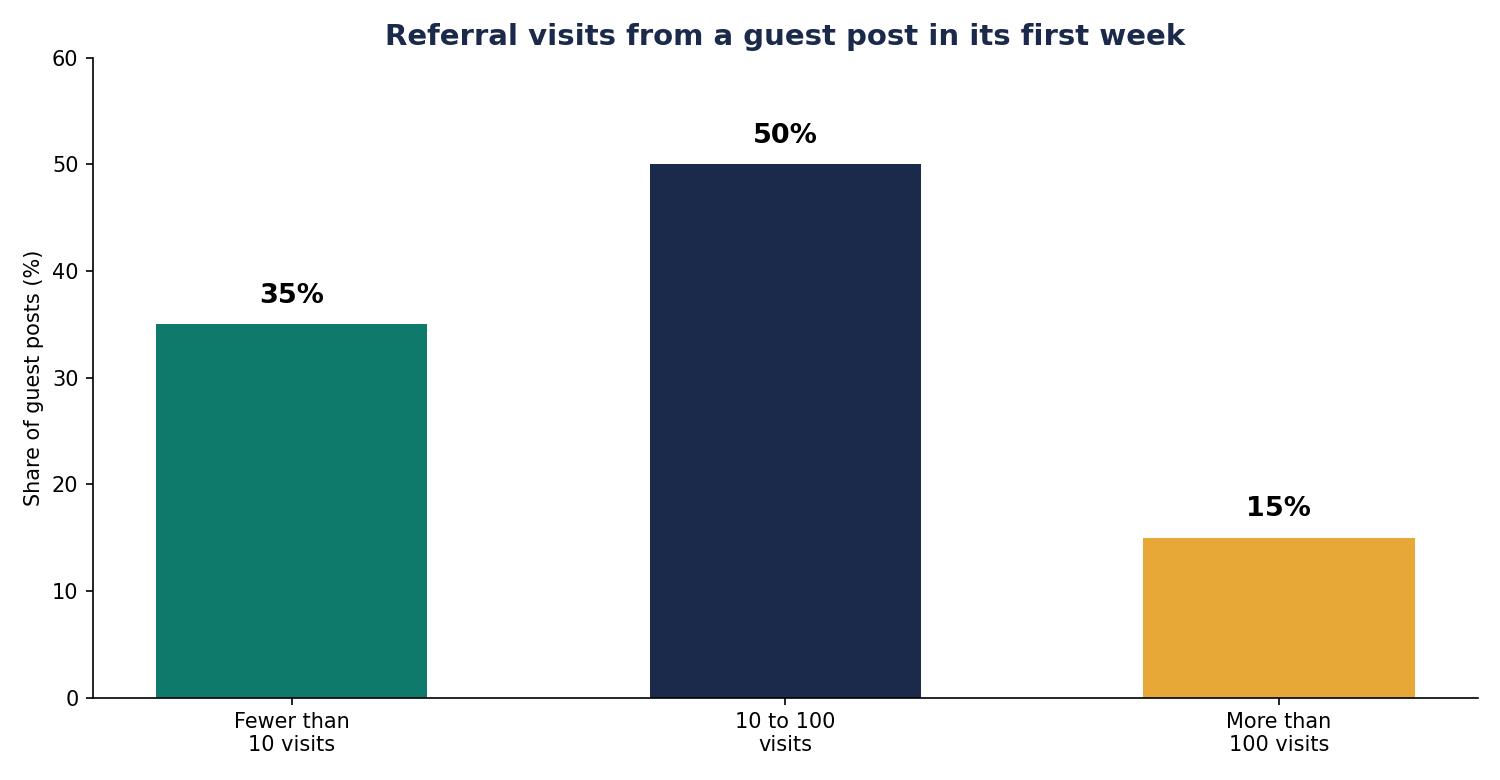
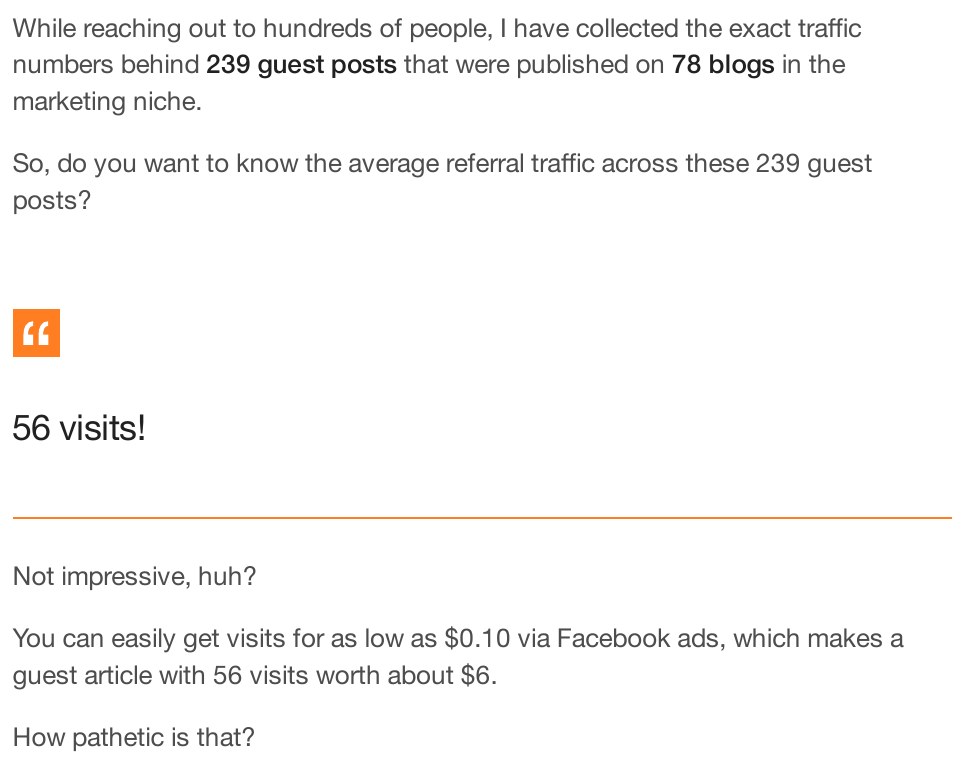
People guest post for several reasons. A backlink from a real, relevant site is the most common one. A guest post can also bring referral traffic, build your name in your field, and start a working relationship with another site owner. What it rarely does on its own is send a flood of visitors. Tim Soulo of BloggerJet collected the traffic figures behind 239 guest posts published on 78 blogs and found the average guest post sent just 56 referral visits in its first seven days — and 35% of those posts sent fewer than 10 visits. Treat a guest post as a link and a reputation builder first, and any traffic as a bonus.
Why guest posting still works
Guest posting has been declared dead many times, and it keeps working for one reason: editors always need good content, and a good article on a real site is still one of the most honest ways to earn a link. The numbers behind it explain both the opportunity and the difficulty.
| Finding | Source and sample |
|---|---|
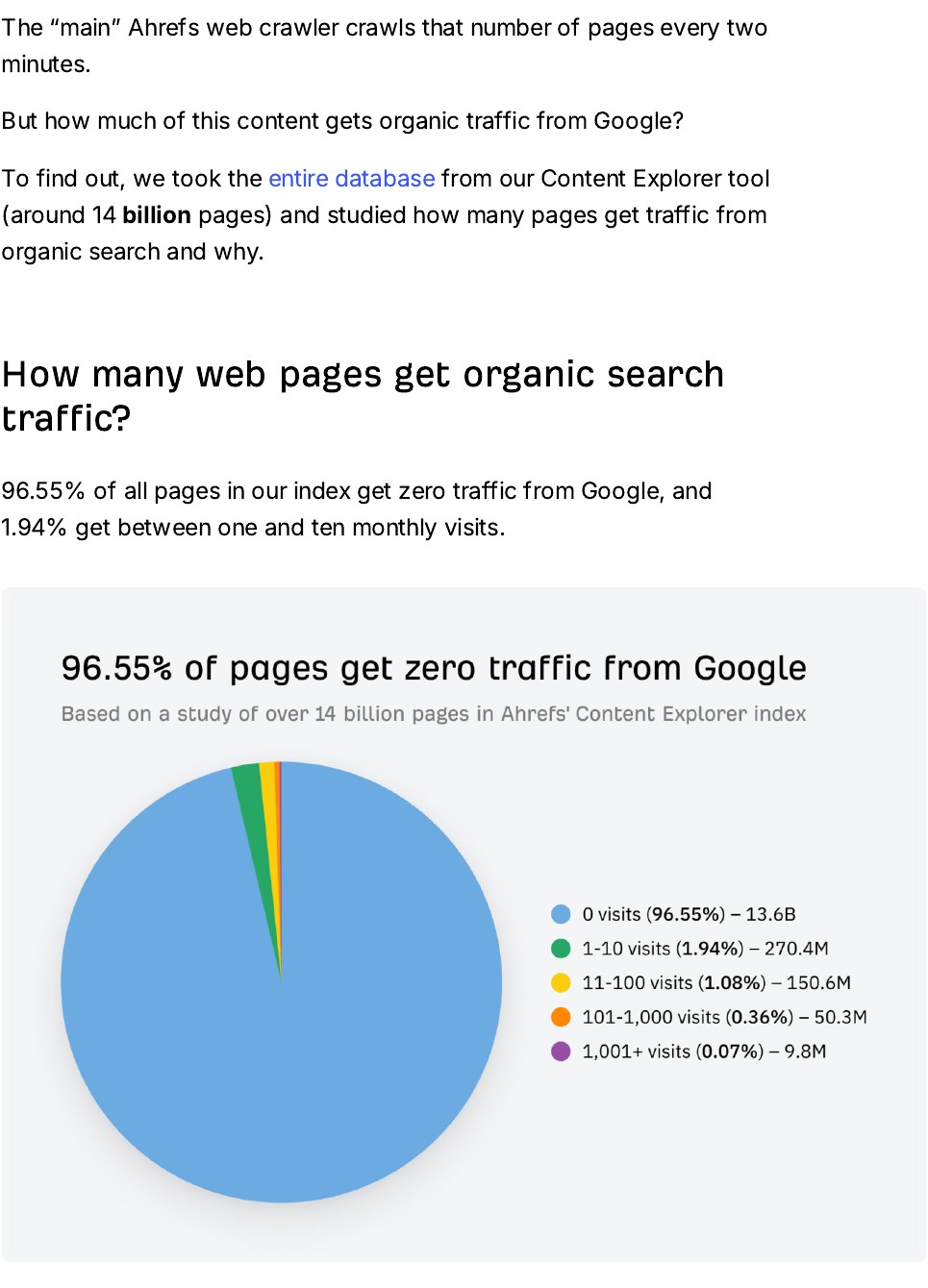
| 96.55% of all pages get zero traffic from Google | Ahrefs, around 14 billion pages, 2023 |
| 66.31% of pages have no backlinks at all | Ahrefs, over 1 billion pages |
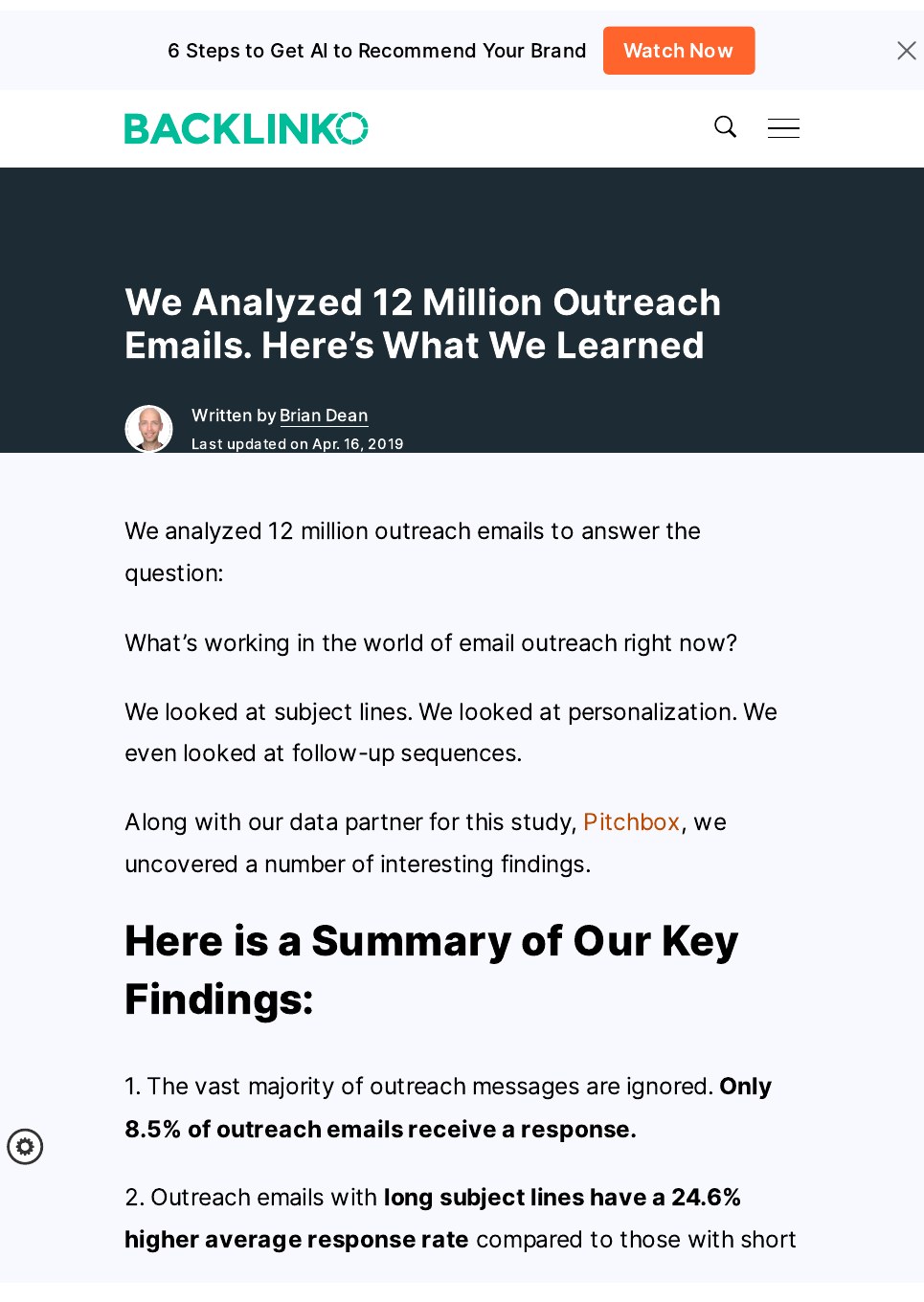
| Only 8.5% of outreach emails get a reply | Backlinko and Pitchbox, 12 million outreach emails, 2019 |
| One follow-up lifts replies by 65.8% | Backlinko and Pitchbox, 12 million outreach emails, 2019 |
| The average guest post sends 56 referral visits in its first week | BloggerJet, 239 guest posts on 78 blogs |
| 35% of guest posts send fewer than 10 referral visits | BloggerJet, 239 guest posts on 78 blogs |
| 3,225 websites accept guest posts, with a median Domain Authority of 43 | Lilach Bullock, guest post database |
Read those figures together and the picture is clear. Most pages on the web have no links and no traffic, so a link from a real site is still worth having. But editors are busy and most pitches are ignored — only 8.5% of outreach emails get any reply at all, according to Backlinko and Pitchbox‘s study of 12 million outreach emails. And most guest posts send only a small number of visitors. The posts that work are the ones placed on real blogs, on a topic the blog’s readers care about, with a link that helps the reader rather than one that only helps the author.
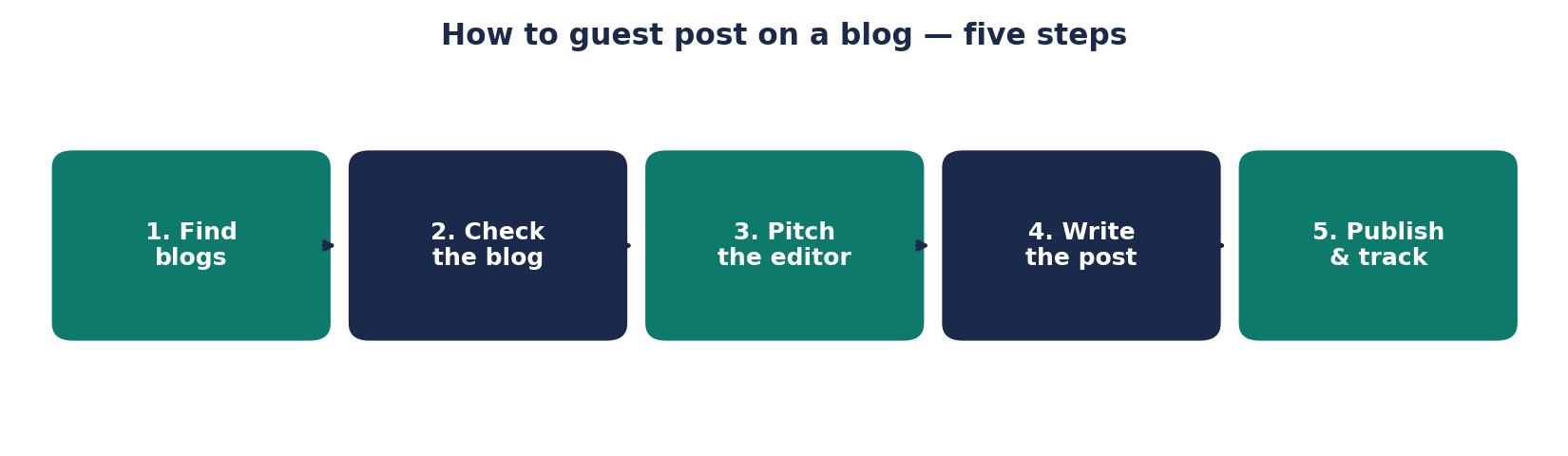
Step 1: Find blogs that accept guest posts
Start with blogs you already read in your field. If you do not read them, your pitch will show it. Make a list of 20 to 30 blogs that cover your topic, have real readers, and publish regularly. Then look for the ones that openly accept guest posts.
The fastest way to find them is a search. Try searches such as “your topic + write for us”, “your topic + guest post guidelines”, or “your topic + submit a guest post”. A blog with a “Write for Us” page is telling you it accepts pitches, and that page usually tells you exactly what it wants: word count, topics, formatting, and how to send the pitch. Read that page before you write anything. It is the editor’s own instruction sheet, and ignoring it is the quickest way to be rejected.
You can also find blogs through the sites that already link to your competitors. If a blog has linked to a similar article before, it has shown it links to this kind of content. Check who links to the best articles on your topic, then look at whether those blogs accept guest posts.
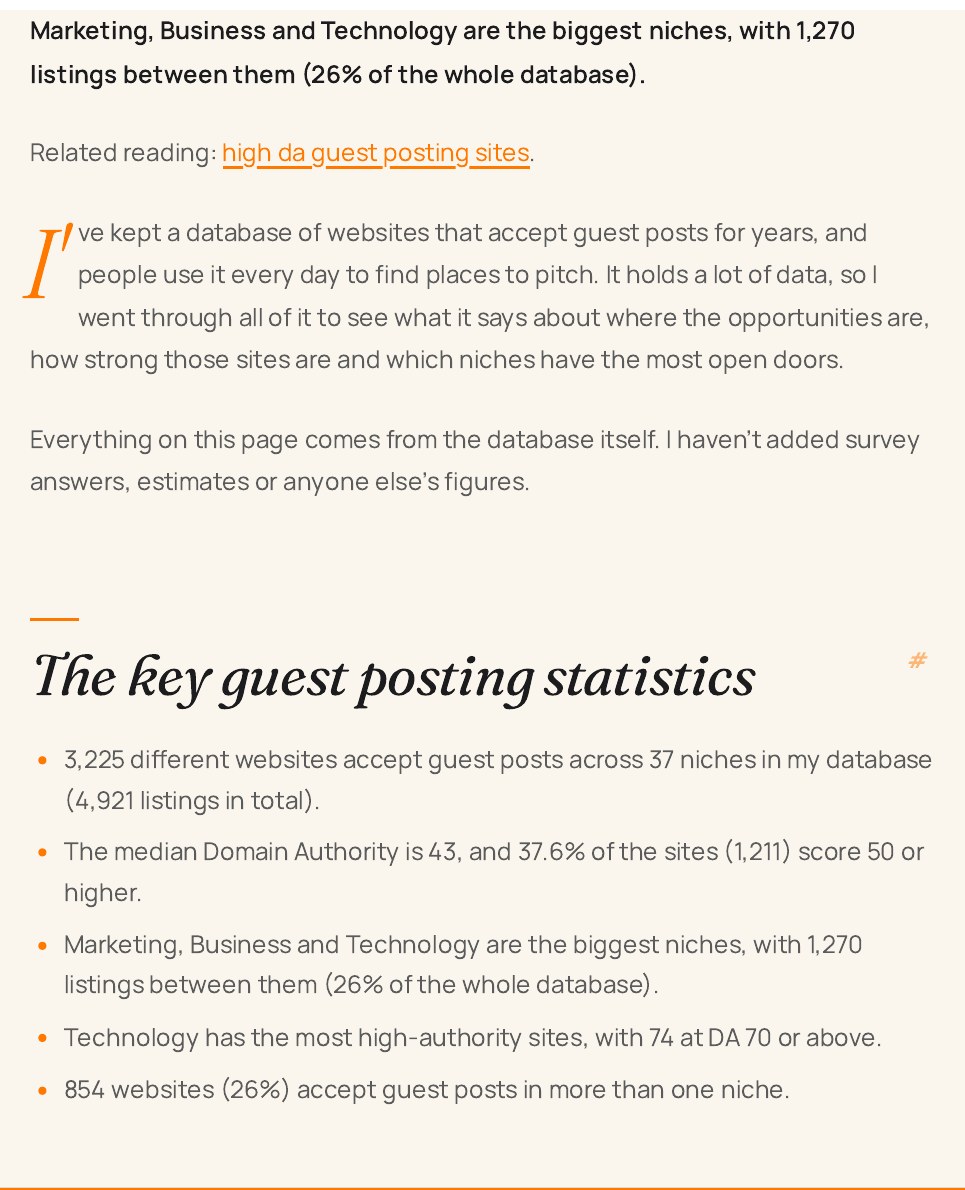
There is no shortage of blogs to pitch. Lilach Bullock‘s guest post database lists 3,225 websites that accept guest posts across 37 niches, with a median Domain Authority of 43 — and 37.6% of them score 50 or higher. You do not need thousands of targets. You need 20 good ones that fit your topic.
Step 2: Check the blog is real before you pitch
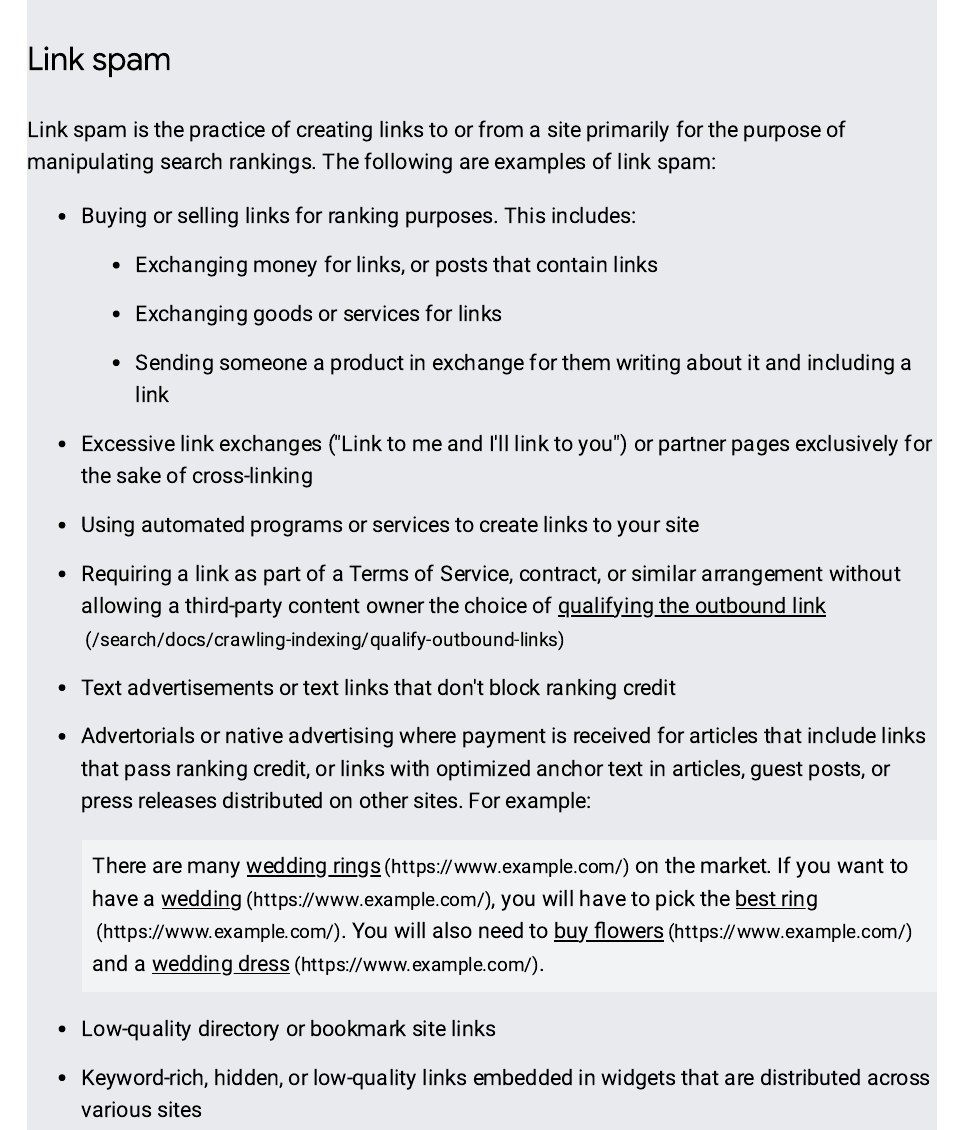
Not every blog that accepts guest posts is worth writing for. Some sites exist only to sell links. They publish anything, have no real readers, and their links pass almost nothing. A post on one of those sites can do your site more harm than good, because Google treats links placed mainly to manipulate rankings as link spam.
Check five things before you pitch:
- Real readers. Does the blog get comments, shares, or social media activity? A blog with no sign of readers probably has none.
- Recent posts. Are new articles going up regularly? A blog that has not published in months is not a good home for your work.
- Relevant topics. Does the blog cover your subject, or something close to it? A link from a relevant blog counts for far more than a link from an unrelated one.
- Real traffic. Use a free tool to check the site’s estimated traffic. A blog with no traffic cannot send you visitors or pass much value.
- Clean look. Is the site full of low-quality guest posts on unrelated topics, with keyword-stuffed links in every paragraph? If so, walk away. That is a link farm with a blog attached.
If a blog passes those checks, it is worth a pitch. If it fails two or more, cross it off the list. Ten good blogs beat a hundred bad ones.
Step 3: Pitch the editor
A pitch is a short email, not an essay. Editors get dozens of pitches a week, and most are ignored. Backlinko and Pitchbox found that only 8.5% of outreach emails receive a response, so your pitch has to earn its reply in the first few lines.
Keep it to five short parts:
- Who you are, in one line. Your name, what you do, and why you know this topic.
- Why this blog. Name a specific article of theirs you read and what you liked about it. A generic “I love your blog” tells the editor you have never read it.
- Your idea. Give the title and a two-sentence summary of the article you want to write. Offer two or three ideas, not one, so the editor can pick.
- Why it fits their readers. Explain what their readers will learn or be able to do after reading it.
- Proof you can write. Link to one or two articles you have already published. If you have none, link to a post on your own site.
Keep the whole email under 200 words. Do not attach a finished article unless the guidelines ask for one — most editors prefer to approve the idea first. Do not offer to pay for the post, and do not ask for a followed link in the pitch. If the editor wants to charge you, or insists on a link with exact-match anchor text, that is a paid placement, not a guest post, and the link must be marked as sponsored.
Then follow up once, a week later, with a short, polite reminder. One follow-up lifts replies by 65.8%, according to the Backlinko and Pitchbox study, so a single follow-up is worth sending. After that, stop. Chasing an editor who has not replied twice will not change their mind, and it will burn the relationship.
Step 4: Write a post worth publishing
Once an editor says yes, write the post their readers deserve. That means writing for the blog’s audience, not for Google, and not for your own link.
Start by reading three or four of the blog’s recent articles. Note the tone, the length, and how they use headings, lists, and images. Your post should feel at home next to them. Then write an outline: a clear introduction, three to five main sections, and a short conclusion. Send the outline to the editor if they asked for it, or just use it to keep yourself on track.
Write in plain language. Use short paragraphs, clear headings, and real examples. Include at least one useful fact, figure, or example the reader can act on. A guest post that only repeats what the blog has already said will not be published twice, and it will not earn you a second invitation.
Aim for the length the blog normally publishes. Many blogs want 1,500 words or more, and longer posts tend to do better — but length is not the goal. A clear 1,200-word post that teaches one thing well beats a padded 2,500-word post that teaches nothing. Add images where they help, with honest captions, and link to useful sources inside the article, not only to your own site.
Before you send it, read it out loud. Fix anything that sounds stiff or unclear. Check every fact and every link. A post with a broken link or a wrong figure tells the editor you did not check your work, and editors remember that.
Step 5: Handle the link and the author bio honestly
The link is the part most people get wrong, and it is the part Google watches most closely. A guest post link should help the reader, not just the author. Link to a page on your site that adds something to the article — a guide, a tool, or a piece of research the reader would want. Use natural anchor text, such as the title of your page, not a keyword-stuffed phrase like “best cheap SEO services”.
Most blogs allow one link in the article and one or two in the author bio. That is enough. Do not ask for more links, and do not stuff links into every paragraph. One good link from a real article is worth more than five links from a post nobody reads.
There is one rule that matters more than the rest: if money, a free product, or anything else of value changed hands for the post, the link must carry a rel=”sponsored” or rel=”nofollow” tag. Google’s spam policies list paying for posts that contain links as link spam, and say paid links are acceptable only when they are qualified with rel=”nofollow” or rel=”sponsored”. An unpaid guest post written to inform readers is fine. A paid post dressed up as an editorial one is not.
Step 6: After the post goes live
Your job is not finished when the editor publishes the post. Share it on your own social media channels and mention the blog — the editor will notice, and it makes a second invitation more likely. Reply to any comments on the post, and thank the editor by email.
Then track what the post does for you. Check your analytics for referral visits from the host blog, and check your backlink tool to confirm the link is live and pointing at the right page. Remember the BloggerJet figures: the average guest post sent 56 referral visits in its first week, and only 15% sent more than 100. If your post sends a handful of visits and one solid link, that is a normal result, not a failure.
Keep a record of every blog you pitch, what you pitched, and what happened. Over time that list becomes your most useful asset: the blogs that said yes once are the blogs most likely to say yes again, and a second post on a blog that already trusts you is far easier to place than a first post on a new one.
What to avoid
A few mistakes turn a good tactic into a bad one. Avoid all of them:
- Posting on any blog that will take you. A link from a low-quality site is worth almost nothing, and a pattern of such links can hurt your site.
- Writing the same post for ten blogs. Editors can tell, readers can tell, and duplicate content helps nobody. Write each post fresh.
- Keyword-stuffed anchor text. Google’s spam policies name links with optimised anchor text in guest posts as link spam. Use natural words.
- Paying for a followed link. If you pay, the link must be marked sponsored or nofollow. Paying for a link that passes ranking credit breaks Google’s rules.
- Pitching without reading the blog. An editor can spot a mass-mailed pitch in seconds, and it goes straight in the bin.
If you would rather have a team handle the outreach for you, take a look at our link building services. We do manual outreach and earn links from real sites — no link farms, no private blog networks, no shortcuts.
Frequently asked questions
What does it mean to guest post on a blog?
To guest post on a blog means to write an article for another website and have it published under your name, usually with a link back to your own site in the article or in your author bio. The host blog gets useful content for its readers, and you get your name in front of a new audience plus a backlink. The editor of the host blog decides whether the post is published.
How do I find blogs that accept guest posts?
Search for your topic plus “write for us”, “guest post guidelines”, or “submit a guest post”. Blogs with a “Write for Us” page openly accept pitches and usually explain what they want. You can also look at which blogs link to articles like yours, since those blogs have already shown they link to this kind of content. Start with a list of 20 to 30 blogs in your field.
Do guest posts help SEO?
Yes, when the host blog is real and relevant. A link from a trusted site in your field is a vote of confidence that Google can count. But most pages have no backlinks at all — Ahrefs found 66.31% of pages have none — so the value comes from the quality of the host blog, not the number of posts. Links from low-quality sites that exist only to sell guest posts pass almost nothing and can hurt you.
How many guest posts do I need to rank?
There is no fixed number, because it depends on your keyword and your competitors. One link from a strong, relevant blog can matter more than ten links from weak sites. A better target is a steady pace — one or two good guest posts a month on real blogs in your field — rather than a large number of posts on sites nobody reads. Track referring domains, not total links.
Should I pay for a guest post?
You can pay a blog to publish your article, but the link must then be marked with rel=”sponsored” or rel=”nofollow”. Google’s spam policies say paying for posts that contain links that pass ranking credit is link spam. An unpaid guest post written to inform readers is fine, and its link can stay unmarked. Never pay for a followed link and present it as editorial.
How long should a guest post be?
Follow the host blog’s guidelines first — they usually state a minimum word count. As a rule, aim for at least 1,200 words, and match the length of the blog’s normal articles. Longer posts give you room to teach something properly, but padding a post to hit a word count helps nobody. A clear post that teaches one thing well beats a long post that says little.

Abdullah Zulfiqar is Co-founder and Client Success Manager at RankWithLinks, an SEO agency helping businesses grow online. He specializes in client relations and SEO strategy, driving measurable results and maximizing ROI through effective link-building and digital marketing solutions.