
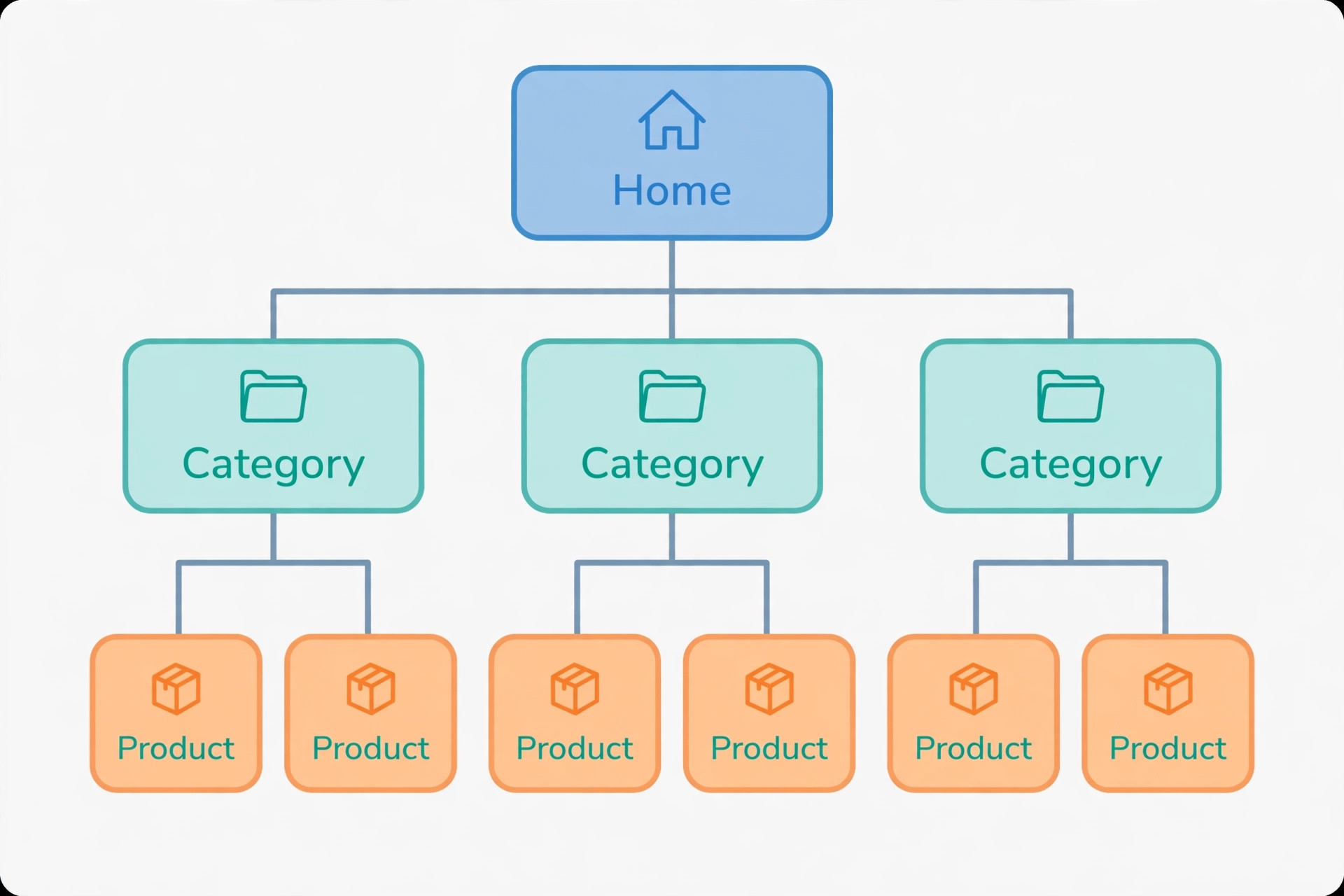
This beginner guide to internal linking for a small ecommerce website shows you how to connect your pages so shoppers and search engines can find everything that matters. Internal links are simply links from one page on your own site to another page on the same site. Your main menu, your category pages, the “you may also like” row under a product, and a link inside a blog post are all internal links.
Small shops often add products one at a time and never step back to check how those pages connect. The result is a shop where some products sit four or five clicks from the homepage, or have no incoming link at all except in the sitemap. Search engines then crawl those pages less often, and shoppers give up before they reach them. Fixing the links between pages you already own costs nothing, and it is one of the few SEO jobs a beginner can finish in a weekend.
What internal linking does for a small shop
Internal links do three jobs. First, they give search engines a path to follow. A crawler that lands on your homepage follows links to collections, then to products, then to guides. A page with no incoming link is much harder to discover. Second, links pass value from strong pages to weaker ones. Your homepage and best-selling collections usually attract the most attention; linking from them to a new product helps that product get noticed. Third, links guide shoppers. A clear path from a guide to the right collection, and from a collection to a related product, keeps people browsing instead of bouncing back to Google.
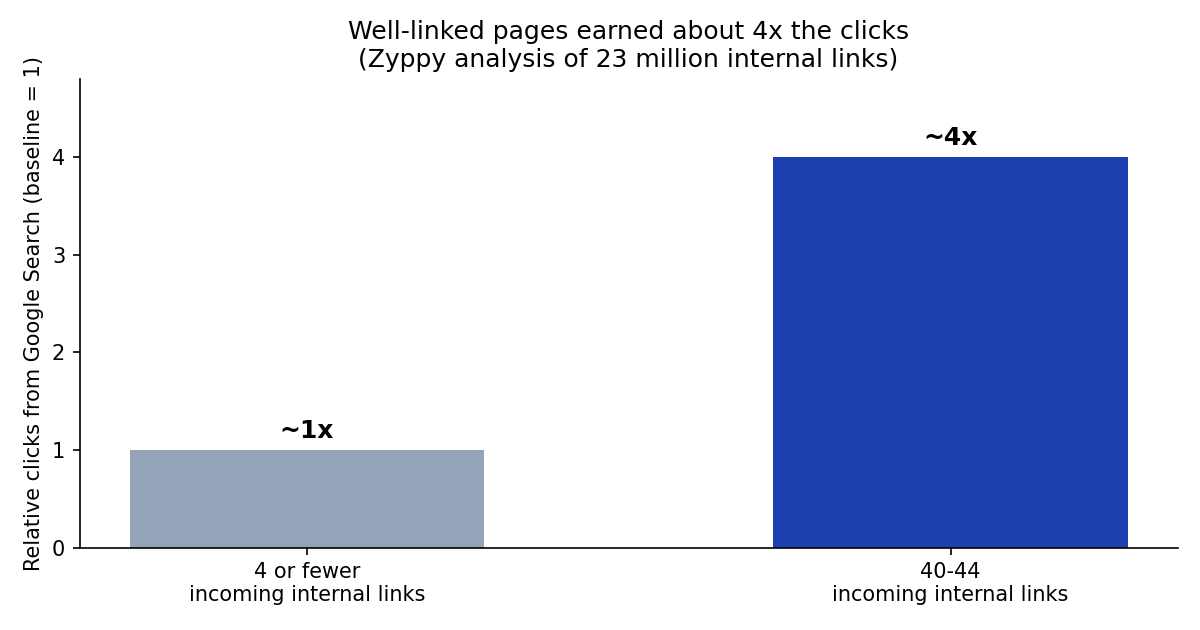
The numbers show why this matters. An analysis of 23 million internal links by Zyppy, reported by Xictron, found that pages with 40 to 44 incoming internal links received roughly four times as many clicks from Google Search as pages with four or fewer incoming links. A retail brand that added internal links to its strong-selling products saw organic traffic rise by 23%, according to a seoClarity case study reported in the same guide. Those are not promises for your shop, but they show the scale of the effect when pages are well connected.
What a link does — Example in a small shop. Helps discovery: a new product linked from its collection is found by crawlers without waiting for the sitemap alone. Passes value: a best-selling collection links to a new product in the same range. Guides shoppers: a buying guide links to the collection it recommends, not just to the homepage. Explains the page: descriptive anchor text tells Google what the linked page is about.
Step 1: Draw your shop’s link map before you change anything
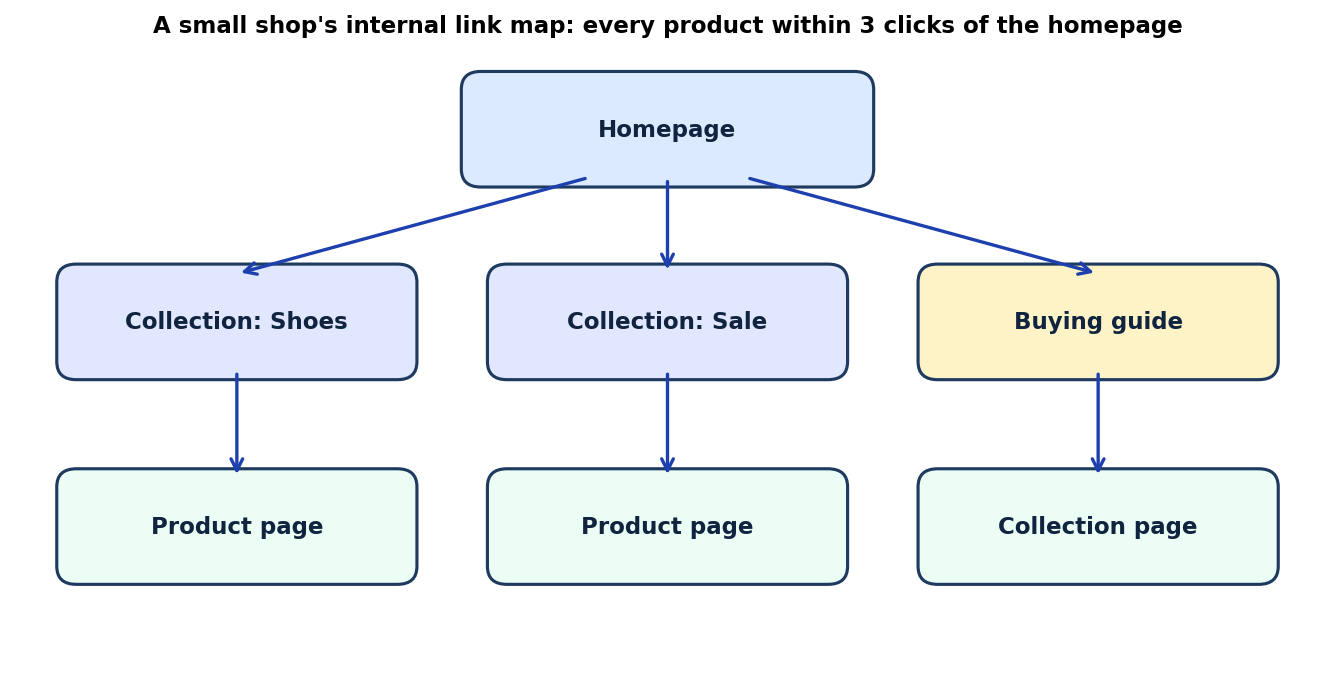
Open a blank sheet or a simple diagram tool and draw three levels. At the top, your homepage. In the middle, your collections or categories, plus any buying guides. At the bottom, your product pages. Draw a line for every real link that already exists between them, including menu links.
Now look for three problems. First, orphan pages: products or guides with no line pointing to them. Second, deep pages: products that need four or more clicks from the homepage. Aim for three clicks at most for every important page: homepage, then collection, then product. Third, dead ends: pages that link to nothing useful, such as a product page with no related products and no link back to its collection.
Keep this map. Every time you add a product, a collection, or a guide, add it to the map first, then add the links. That one habit prevents most orphan pages.
Step 2: Build the structure with collections and menus
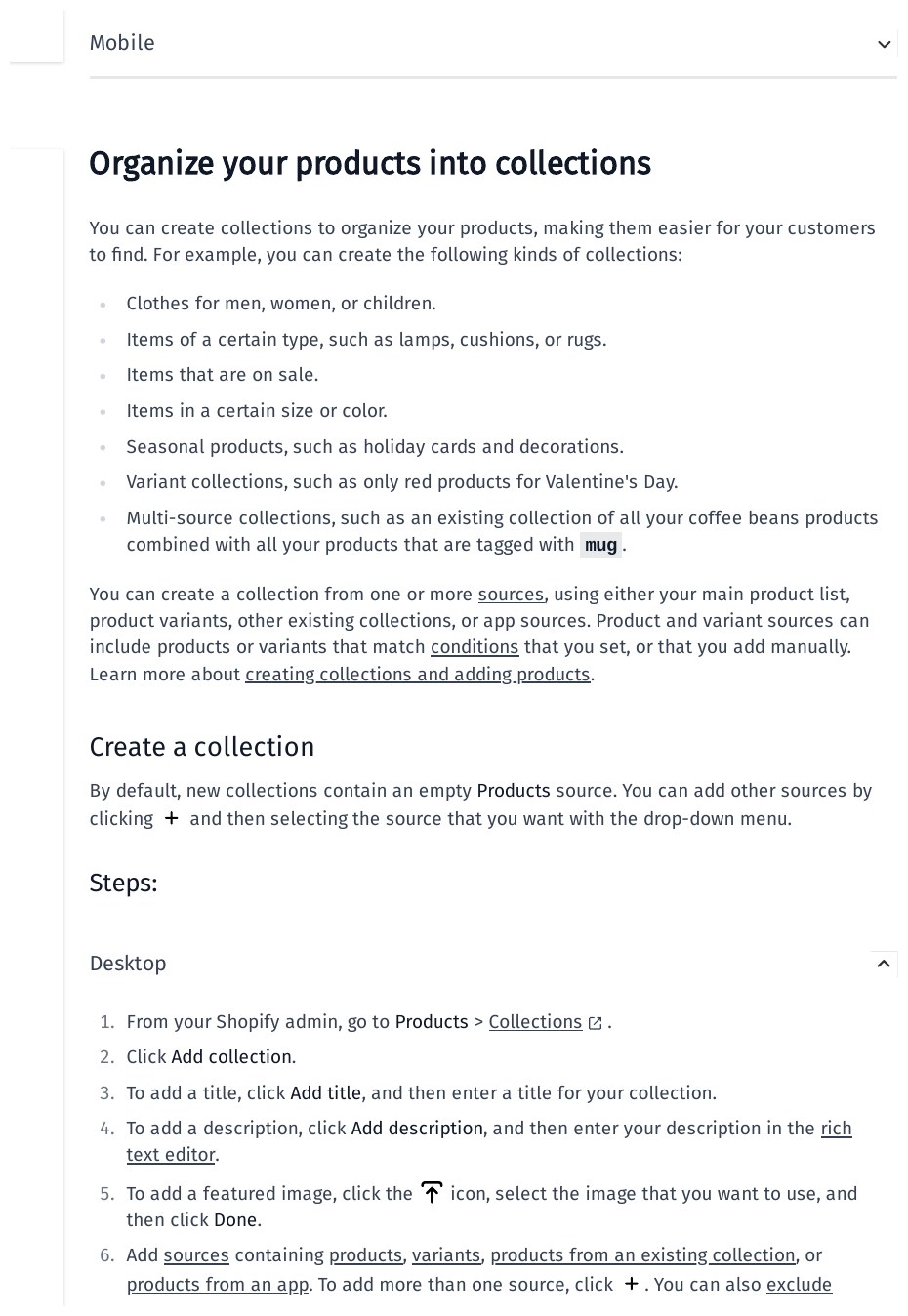
For most small shops, collections are the backbone of internal linking. A collection groups products that belong together, such as shoes, sale items, or gifts under a set price. Shopify’s own setup guide explains that collections make products easier for customers to find, and that you create them from Products, then Collections, in your admin. Link every collection from your main menu, and link every product to at least one collection.
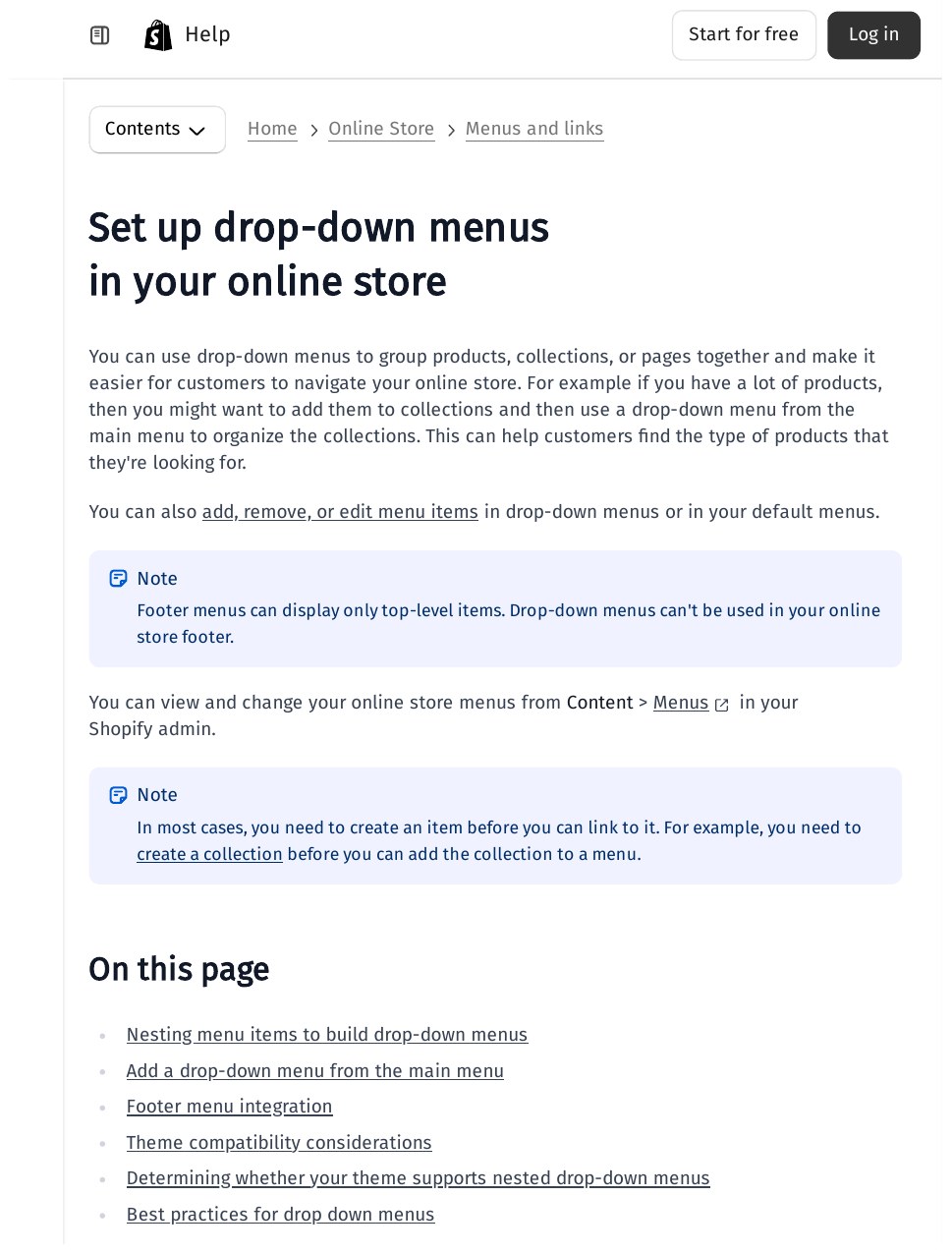
Next, set up your menus so the structure is visible on every page. In Shopify, you manage menus from Content, then Menus, in your admin, and you can nest items to build drop-down menus that group collections under one heading. Keep the main menu short: your main collections, one or two guides, and the pages shoppers expect, such as delivery information. A menu with twenty items helps nobody, and it spreads link value thinly across pages that do not need it.
Add breadcrumbs to product and collection templates if your theme supports them. A breadcrumb such as Home, then Shoes, then the product name gives every product page a link back to its collection and to the homepage, and it tells shoppers exactly where they are.
Step 3: Write anchor text that describes the destination
Anchor text is the clickable wording of a link. Google’s own link best practices say anchor text should be descriptive, reasonably concise, and relevant to both the page it sits on and the page it points to. Links must also be crawlable, which in practice means a normal HTML link with an href address, not a button that only works through a script.
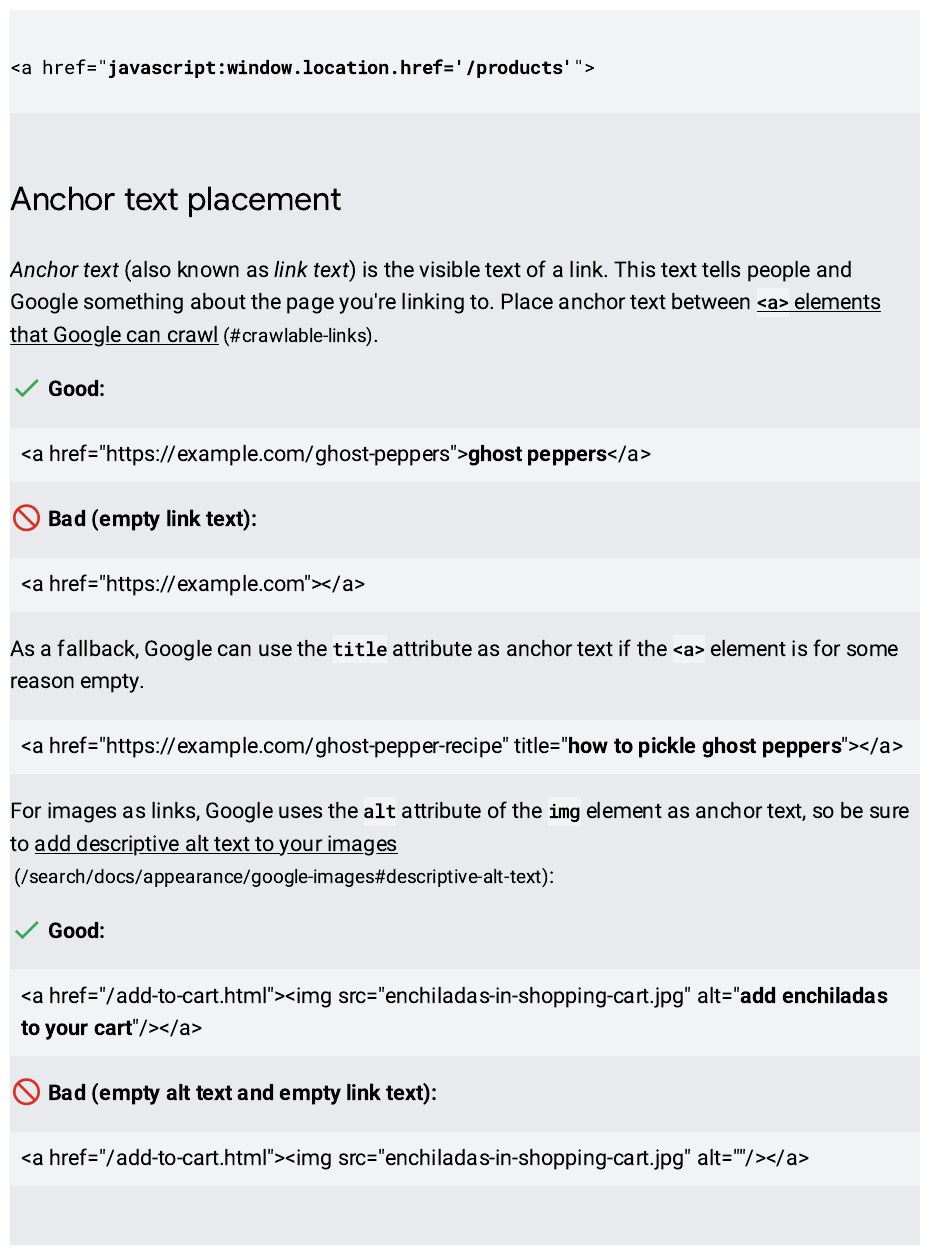
Good anchor text names the destination. “Leather walking boots” is good when it links to that product. “Click here” is weak, because it tells neither the reader nor Google where the link goes. Do not stuff the same exact keyword into every link to a page either. Vary the wording naturally: “walking boots”, “our leather walking boots”, and “the boots in this guide” can all point to the same product when the sentence supports them. One clear, descriptive link in a sentence beats a row of keyword links with no context around them.
Step 4: Link from content, not just from navigation
Menus and breadcrumbs give every page its basic links. Content links do the finer work. When you write a buying guide, link to the collections and products it mentions, at the point in the text where the reader would want them. When a product page mentions a related item, link to that item by name. When a collection page introduces a range, link to the guide that explains how to choose between the options.
A practical rule for a small shop is three to five contextual links in a guide or blog post, plus the navigation and breadcrumb links that are already there. That figure matches the starting point Ahrefs suggests for articles, as reported in the Xictron guide. Longer guides can carry more, but each link should earn its place in the sentence. If you cannot explain in one line why the reader would click, leave the link out.
Also link new pages the day you publish them. A new product with no link from a collection, a guide, or the homepage is an orphan from day one, even if it appears in your sitemap. Add the collection link, add it to the menu if it is a main range, and add one content link from the most relevant guide. Then check the page is reachable by clicking through it yourself, as a shopper would.
Step 5: Find and fix orphan, broken, and duplicate-address pages
Once the basics are in place, run a check. You can use Google Search Console’s Links report to see which of your pages receive internal links, and a crawler such as Screaming Frog SEO Spider to list pages with no incoming links, broken links, and redirect chains. Export the list, then work through it in this order.
First, fix broken links. A link to a deleted product or a changed address sends shoppers and crawlers to a dead end. Point it to the closest live page, or remove it. Second, rescue orphans. Give each orphan product a place in a collection, and give each orphan guide a link from a related collection or post. Third, watch duplicate addresses. On Shopify, the same product can be reached at its plain product address and through a collection address, and variant or filter addresses can create further copies. Link to the plain product address in your menus and content, and let the canonical tag point search engines to that one version.
A simple monthly routine
Internal linking is not a one-time job. Products sell out, ranges change, and guides go out of date. Once a month, spend thirty minutes on this checklist. Check that every new product is in a collection and linked from a guide or collection page. Check for broken links after any product or page is deleted. Check that no collection is missing from the main menu. Check the Search Console Links report for pages with no internal links. Small, regular fixes keep the structure sound, and they stop the slow build-up of orphan pages that quietly cost a shop traffic.
If you want help with the wider job, our manual outreach team builds links to the pages your internal structure supports. See our link building services for how we work, with no private blog networks and no automated placements.
Frequently asked questions
How many internal links should a product page have?
There is no fixed number from Google, and more is not always better. A product page needs its menu, its breadcrumb, links to its collection, and a few related-product links. A guide can carry three to five contextual links in its body, plus navigation. Focus on links a shopper would actually use, not on hitting a count.
Do footer links help internal linking?
Footer links are crawlable, but they are the weakest kind of link, because they sit on every page and carry little context. Use the footer for pages shoppers expect there, such as delivery, returns, and contact pages. Do not stuff the footer with keyword links to product pages in the hope of ranking them; a contextual link from a guide or collection page is worth far more.
Should internal links use nofollow?
No. Keep internal links as normal, followable links so crawlers can pass through them and pass value to the destination. The nofollow attribute is for links you do not endorse, such as untrusted user content or paid links, not for links between your own pages.
Should I link to variant or filter addresses on Shopify?
No. Link to the plain product address, such as /products/leather-walking-boots, not to the collection version of the address or to an address with a variant or filter added. The canonical tag should point to the plain version too, so search engines treat one address as the real page.
How long does it take for internal linking changes to show results?
There is no fixed timeline, and anyone who promises one is guessing. Crawling and indexing of newly linked pages can happen within days, while ranking movement usually takes weeks, because search engines need to recrawl the changed pages and reassess them. Track progress in Search Console by watching coverage and clicks for the pages you linked, rather than checking rankings daily.
What is the single biggest internal linking mistake small shops make?
Leaving pages with no incoming link. A product that is only in the sitemap, a guide that nothing links to, and a collection missing from the menu are all common in small shops. Before you worry about anchor text or link counts, make sure every important page has at least one clear, crawlable link pointing to it from another page on your site.
Sources
Google Search Central, SEO link best practices: https://support.google.com/webmasters/answer/9112205
Shopify Help Center, setting up your store (collections): https://help.shopify.com/en/manual/intro-to-shopify/initial-setup/setup-your-store
Shopify Help Center, drop-down menus: https://help.shopify.com/en/manual/online-store/menus-and-links/drop-down-menus
Xictron, Internal Linking: Ecommerce SEO Optimization Guide 2026 (reporting Zyppy’s 23-million-link analysis and seoClarity case studies): https://www.xictron.com/en/blog/internal-linking-ecommerce-seo-optimization-2026/
Photoroom, Shopify SEO Guide 2026 (homepage, collections, products structure): https://www.photoroom.com/blog/shopify-seo

Abdullah Zulfiqar is Co-founder and Client Success Manager at RankWithLinks, an SEO agency helping businesses grow online. He specializes in client relations and SEO strategy, driving measurable results and maximizing ROI through effective link-building and digital marketing solutions.