
I have been doing SEO for over six years. And the question I get asked more than any other — from startup founders, bloggers, small business owners, and even web developers — is this:
“I have a website. Now how do I actually do SEO on it?”
It sounds simple. But most guides either go too shallow or drown you in jargon.
This guide is different. I am going to walk you through exactly how to incorporate SEO into your website, step by step, in the order that actually matters. Whether your site is brand new or already live with zero traffic, this is the process I use for every client at RankWithLinks.
Let’s get into it.
What You Will Learn
- How to set up your SEO foundation the right way
- How to research keywords before writing anything
- How to optimize every page for Google and for people
- How to fix technical issues silently killing your rankings
- How to build backlinks that actually move rankings
- How to incorporate SEO into an existing website
What “Incorporating SEO Into a Website” Actually Means
A lot of people think SEO means stuffing keywords into their content. That is not what it means, and doing that will actually hurt your rankings.
Incorporating SEO into your website means making every part of your site — the content, the structure, the code, and the links pointing to it — work together so Google can find it, understand it, and rank it for the right searches.
There are three pillars:
On-Page SEO — Optimizing your content, headings, titles, meta tags, images, and internal links on each page.
Technical SEO — Making sure your site is fast, mobile-friendly, crawlable, and structured correctly so Google can index it properly.
Off-Page SEO — Building authority through backlinks from other websites in your niche.
All three matter. Ignore any one of them and your rankings will plateau, no matter how hard you work on the other two.
Step 1 — Set Up Your SEO Foundation First
Before writing a single word of content, get your technical foundation right. Most people do this last. That is a mistake.
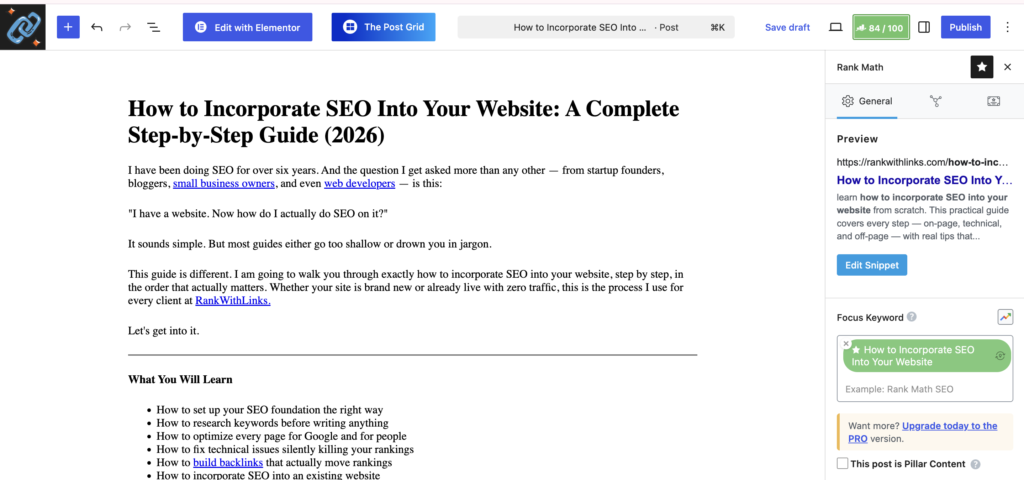
Install an SEO Plugin
If you are on WordPress, install either Yoast SEO or RankMath. Both are free for core features.
What they give you:
- Control over meta title and meta description on every page
- Automatic XML sitemap generation
- Robots.txt editing
- Schema markup options
- On-page SEO analysis as you write
RankMath is my personal preference for new sites in 2026. It gives more features on the free plan and the interface is cleaner.
Connect Google Search Console
This is non-negotiable. Google Search Console is free and it is the most important SEO tool that exists — because it shows you exactly what Google sees.
How to set it up:
- Go to search.google.com/search-console
- Click “Add Property” and enter your domain
- Verify ownership via DNS record or HTML tag
- Go to Sitemaps and submit yoursite.com/sitemap.xml
Once connected, GSC will show you which keywords trigger your pages, which pages are indexed, crawl errors, and Core Web Vitals scores. You cannot make smart SEO decisions without this data.
Connect Google Analytics 4
GA4 tells you what visitors do after landing on your site. GSC tells you how they found you. Together they give you the complete picture.
Link GA4 to GSC inside the GA4 Admin panel under “Search Console Links.” Now you can see which organic keywords lead to conversions, not just page views.
Choose Your URL Structure and Lock It In
Do this before publishing anything, because changing URLs after pages rank will destroy those rankings.
Good URL: yoursite.com/how-to-incorporate-seo-into-website
Bad URLs:
yoursite.com/?p=1234
yoursite.com/2026/06/blog-post-title
yoursite.com/Blog/How-To-Do-SEO
Rules: lowercase only, hyphens between words, no dates, no numbers, include the target keyword, keep it short.
Step 2 — Do Keyword Research Before Every Page
This is where most website owners go wrong. They write content based on what they think people search for, instead of what people actually search for.
Keyword research removes the guesswork.
Find One Primary Keyword Per Page
Every page on your website should target one primary keyword. One. Not three, not five. Trying to rank for multiple unrelated keywords on one page splits your focus and confuses Google about what the page is actually about.
Free methods to find keywords:
Google Autocomplete — Start typing your topic in Google and look at the dropdown suggestions. Every suggestion is a real query from a real person.
People Also Ask — Every Google results page shows a PAA box. These questions are perfect for FAQ sections and H2 headings.
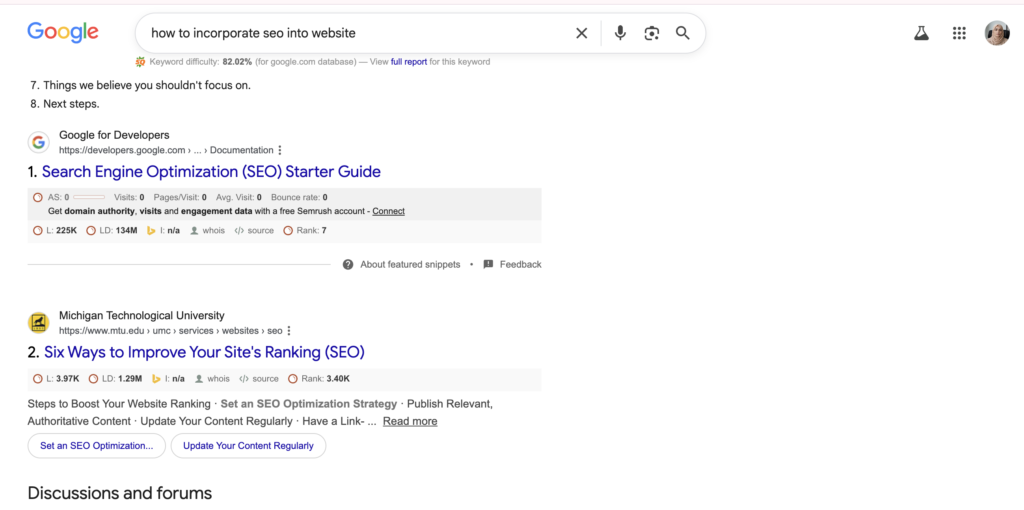
Related Searches — Scroll to the bottom of any Google results page. The eight related searches shown are high-value secondary keywords to include naturally in your content.
Understand Search Intent
Before writing anything, ask yourself: why would someone search this keyword? What do they actually want?
| Intent Type | Example Keyword | Content Type to Create |
|---|---|---|
| Informational | how to incorporate seo into website | Step-by-step guide or tutorial |
| Commercial | best seo tools 2026 | Comparison or review article |
| Transactional | buy seo services | Service or product page |
| Navigational | ahrefs login | Not worth targeting |
If your content type does not match the intent, you will not rank — no matter how well optimized the page is. Google figures out intent by looking at what content already ranks. If the top 10 results are all listicles, write a listicle. If they are all how-to guides, write a guide.
Step 3 — Optimize Every Page With On-Page SEO
Now you have your keyword and you understand the intent. Time to write and optimize.
Here is the exact on-page checklist I run through for every piece of content:
| Element | What to Do |
|---|---|
| Title Tag | Include primary keyword, keep under 60 characters, add year |
| Meta Description | 150-155 characters, include keyword, state clear benefit |
| H1 Heading | One per page, must contain primary keyword |
| First 100 Words | Use primary keyword naturally in opening paragraph |
| H2 Subheadings | Include secondary keywords, cover all subtopics readers expect |
| Image File Names | Rename files before uploading (seo-website-setup.jpg not IMG001.jpg) |
| Image Alt Text | Describe image, include keyword where it fits naturally |
| Internal Links | Add at least 2-3 links to relevant pages on your own site |
| External Links | Link to 1-2 authoritative sources — Google, research studies, etc |
| URL Slug | Short, keyword included, lowercase, hyphens |
| Word Count | Match or beat the top-ranking competitor |
| FAQ Section | 4-6 questions from People Also Ask |
| Schema Markup | Article + FAQ + Breadcrumb minimum |
One thing I want to emphasize from personal experience: keyword placement matters, but keyword stuffing is actively harmful. I have audited sites where every second sentence contained the exact keyword phrase, and they were sandboxed. Write for the reader. Optimize after the draft is done.
How to Write Title Tags That Get Clicked
Your title tag is your ad on the search results page. It needs to do two things: include the keyword so Google ranks it, and be compelling enough that people click it instead of the result above or below.
Formula that works: Primary Keyword + Unique Angle + Year
Example: How to Incorporate SEO Into Your Website: Step-by-Step Guide (2026)
Avoid clickbait. Avoid vague titles. Be specific about what the reader will get.
How to Write Meta Descriptions That Drive Clicks
Meta descriptions do not directly affect rankings, but they affect click-through rate, which does affect rankings indirectly.
Keep it under 155 characters. Include the keyword. State a clear benefit. End with a soft CTA.
Example: Learn how to incorporate SEO into your website step by step. Covers on-page, technical, and off-page SEO with practical tips that work in 2026.
Step 4 — Fix Technical SEO Issues That Kill Rankings
Great content on a broken website ranks nowhere. I have seen this dozens of times. A client comes with excellent content, solid backlinks, and still ranking on page three. We run a technical audit and find the site is loading in six seconds, has duplicate title tags on forty pages, and half the internal links are broken.
Fix technical SEO and rankings move. Every time.
Site Speed and Core Web Vitals
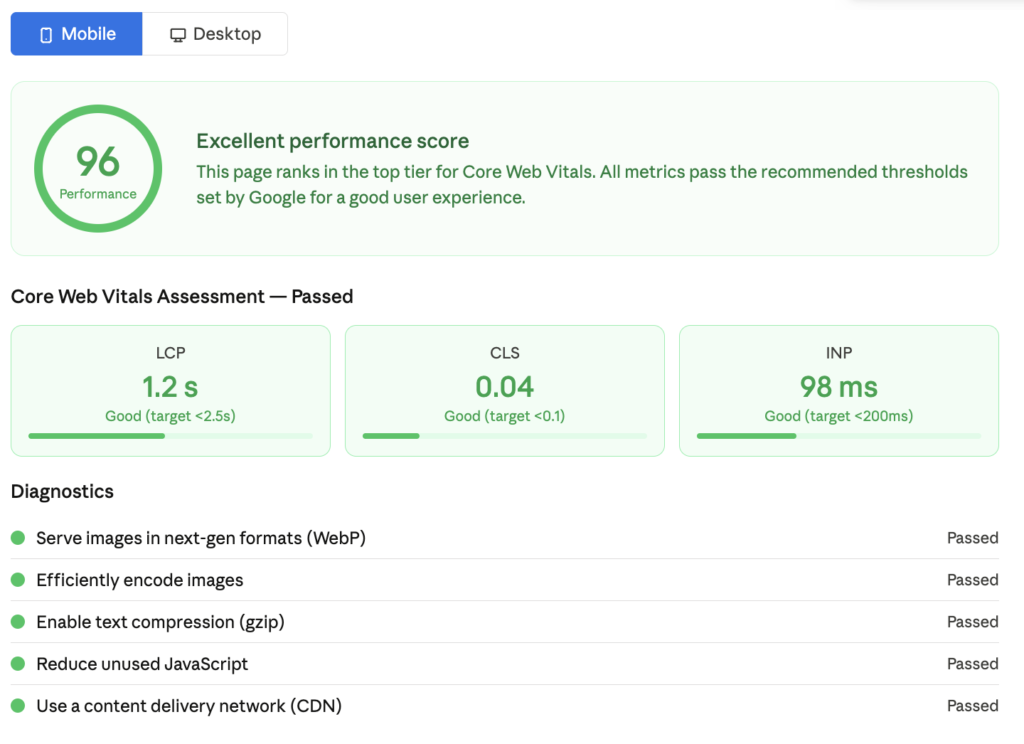
Google measures page speed through Core Web Vitals. The three that matter for rankings:
LCP (Largest Contentful Paint) — How fast your main content appears. Target: under 2.5 seconds.
CLS (Cumulative Layout Shift) — How much your page jumps around while loading. Target: under 0.1.
INP (Interaction to Next Paint) — How fast your page responds to user interaction. Target: under 200 milliseconds.
How to improve these:
- Compress all images before uploading. Use WebP format instead of JPEG or PNG.
- Install a caching plugin. WP Rocket or LiteSpeed Cache for WordPress.
- Use good hosting. Shared hosting with thousands of sites on one server will kill your speed scores.
- Enable a CDN (Content Delivery Network). Cloudflare’s free plan works for most sites.
Mobile-Friendliness
Google uses mobile-first indexing. This means it crawls and ranks your site based on the mobile version, not the desktop version. If your mobile site is broken, your rankings are broken on all devices.
Test your site at Google’s Mobile-Friendly Test. Fix everything flagged before publishing new content.
HTTPS
If your site is still on HTTP, fix this today. HTTPS is a confirmed ranking signal. More importantly, browsers now warn visitors that HTTP sites are “not secure,” which destroys trust and increases bounce rate.
Most hosts provide free SSL certificates through Let’s Encrypt. Enable it, then set up a 301 redirect from all HTTP URLs to HTTPS.
XML Sitemap
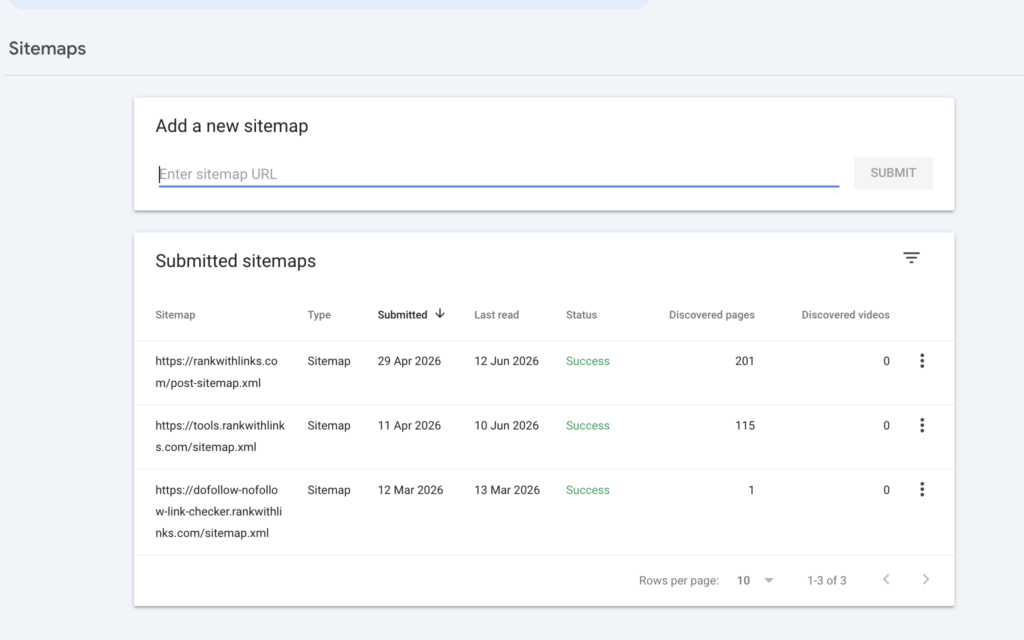
Your sitemap tells Google which pages exist on your site and when they were last updated. Yoast and RankMath generate one automatically. Submit it in GSC under the Sitemaps section.
Fixing Crawl Errors
Check the Coverage report in GSC at least once a month. Any page showing as an error is not being indexed by Google, which means it cannot rank.
Fix 404 errors by either restoring the page or setting up a 301 redirect to the most relevant live page.
Duplicate Content
If the same content appears on multiple URLs, Google gets confused about which one to rank and often ranks neither. Use canonical tags to point Google to the correct version of each page. Your SEO plugin handles this automatically if configured correctly.
Step 5 — Build Content That Earns Rankings and Builds Trust
Google’s Helpful Content System is designed to reward content written by real people with real experience. Here is what that actually looks like in practice.
Show That You Have Done This Yourself
Generic explanations that could apply to any industry do not build trust. Specific, experience-based insights do.
Instead of: “Backlinks are important for SEO.”
Write: “When we added twelve niche-relevant backlinks to a client’s service page over three months, it moved from position 19 to position 4. The links were all from real blogs in the same industry, not directories.”
That second version builds E-E-A-T. It shows experience, expertise, authority, and trustworthiness — the four things Google looks for when deciding which content deserves to rank.
Cover Topics More Completely Than Your Competitors
Before writing, open the top five pages ranking for your keyword. Read them completely. Note every question they answer. Then ask: what did they leave out? What would someone reading that article still want to know?
Your article should answer every question their articles answer, plus at least two or three things they missed.
Pros and Cons of DIY SEO vs Hiring an SEO Agency
| Factor | DIY SEO | Hiring an Agency |
|---|---|---|
| Cost | Low (mainly your time) | Higher monthly investment |
| Speed | Slower learning curve | Faster results if agency is good |
| Control | Full control | Depends on communication |
| Expertise | Limited to what you learn | Access to specialists |
| Scalability | Hard to scale alone | Agency can scale with you |
| Best For | Solo bloggers, tight budgets | Growing businesses, competitive niches |
Use Short Paragraphs
This is the single easiest content improvement most people never make. Long blocks of text make readers leave. Short paragraphs keep them reading.
Three sentences maximum per paragraph. Often one or two is better. White space is your friend.
Update Your Content Regularly
Content decay is real. A page that ranked number one in 2024 can drop to page three in 2026 if it is not updated. Add a “Last Updated” date visibly on the page, refresh any statistics or examples, and check that all external links still work.
I update every high-performing article on RankWithLinks at least once every six months.
Step 6 — Build Backlinks to Your Website
Backlinks are still one of the strongest ranking signals Google uses. A backlink is when another website links to yours. Google treats these as votes of confidence — the more high-quality votes you have, the more authority your site gains.
The key word is high-quality. Ten backlinks from relevant, real websites in your niche are worth more than five hundred links from random directories.
Guest Posting
Write an article for another website in your niche and include a link back to your site within the content. This is the most reliable white-hat link building method that has worked consistently for years.
When choosing sites to guest post on, look for: real traffic (not just high DR), relevance to your niche, genuine editorial standards, and an engaged audience.
Link Insertion (Niche Edits)
Find existing articles on relevant websites that are already ranking and already have traffic. Reach out to the site owner and suggest adding your link where it genuinely adds value to their existing content.
This method works well because you are placing your link in content that is already indexed and already trusted by Google.
Internal Linking
Most people treat internal links as an afterthought. They are not. Internal links pass authority between your own pages and help Google understand which pages on your site are most important.
Rule: every new page you publish should link to at least two or three existing pages. And every relevant existing page should link back to the new one.
How to Incorporate SEO Into a Website That Is Already Live
If your website already has pages published but little to no SEO work done, here is the fastest path to results.
Do not start over. Optimize what you have.
Step 1 — Audit Your Existing Pages
Use Screaming Frog (free up to 500 URLs) to crawl your site and identify: missing title tags, missing meta descriptions, duplicate content, broken links, missing alt text, and pages blocked from indexing.
Fix the most critical issues first: missing titles and metas, broken links, and blocked pages.
Step 2 — Find Which Pages Already Have Rankings
In Google Search Console, go to Performance > Search Results. Filter by Clicks and look for pages sitting in positions 5 to 20. These are your quickest wins.
Pages in that range are close to the first page. A bit of on-page optimization and a few backlinks can push them there, and that is where the traffic starts.
Step 3 — Add Missing Optimization to Existing Pages
Go through each of your top pages and check every item in the on-page checklist from Step 3. Add missing meta descriptions. Add internal links. Add FAQ sections. Optimize image alt text.
Often a page ranking position 12 jumps to position 6 with these simple fixes — no new content needed.
Step 4 — Compress All Existing Images
This is one of the most overlooked quick wins for existing sites. Run all your uploaded images through a compression tool. Uncompressed images are one of the top reasons sites fail Core Web Vitals scores.
Step 5 — Submit an Updated Sitemap
After making changes, go to GSC and request re-indexing for your updated pages. Submit your sitemap again to trigger a fresh crawl.
SEO Website Checklist — Full Reference
On-Page SEO
- Primary keyword in title tag
- Primary keyword in H1
- Primary keyword in first 100 words
- Meta description written and under 155 characters
- H2 headings cover all main subtopics
- All images have descriptive alt text
- At least 2-3 internal links added
- At least 1-2 external links to authoritative sources
- FAQ section added
- Article + FAQ schema markup added
- URL slug is short and includes keyword
Technical SEO
- Site loads in under 3 seconds
- Mobile-friendly test passed
- HTTPS active and HTTP redirected
- XML sitemap submitted to GSC
- No crawl errors in GSC Coverage report
- No duplicate title tags or meta descriptions
- Canonical tags set correctly
Off-Page SEO
- At least 3 backlinks from relevant niche sites
- Internal links from existing pages pointing to new page
- Page submitted for indexing in GSC
Frequently Asked Questions
How long does it take to see SEO results after adding SEO to a website?
For a brand new website, expect three to six months before significant organic traffic starts coming in. This is not because SEO is slow — it is because Google takes time to crawl new sites, build trust in them, and test how users respond to them. Sites with existing authority can see results from newly optimized pages in weeks.
Can I do SEO on my website without spending any money?
Yes. Google Search Console and Google Analytics 4 are both free. Yoast SEO and RankMath both have free versions that cover all core on-page optimization features. The main investment with DIY SEO is your time, not your money.
What is the most important SEO factor for a website in 2026?
Content relevance and backlinks together. Neither works well alone. High-quality content with no backlinks struggles to rank in competitive niches. Backlinks pointing to thin or irrelevant content do not help either. You need both working together.
How often should I update my website’s SEO?
SEO is not a one-time task. Do on-page optimization every time you publish new content. Check GSC for crawl errors and performance drops monthly. Update your top-performing articles every six months. Build backlinks continuously.
Is SEO different for different types of websites?
The core principles are the same, but the application differs. Local businesses need to optimize for local search and Google Business Profile. E-commerce sites need product schema and faceted navigation management. SaaS companies need to focus on bottom-of-funnel keywords. The steps in this guide apply to all of them.
Do I need to know how to code to do SEO on my website?
No. Using WordPress with an SEO plugin like Yoast or RankMath handles almost all technical implementation without any coding. For more advanced technical SEO — schema markup customization, hreflang tags, JavaScript rendering issues — some technical knowledge helps, but it is not required to get started and see results.
Conclusion
Incorporating SEO into your website is not about tricks or shortcuts. It is about building a site that Google can understand and that people actually want to read.
Set up your foundation correctly before you start publishing. Research keywords before writing anything. Optimize every page with the checklist in this guide. Fix your technical issues. Build real backlinks from relevant sites.
Do all of that consistently and your site will rank. Not overnight. But it will rank.
If you want help with the link building side of this process, that is exactly what we do at RankWithLinks. Check out our link building services to see how we help SaaS and digital marketing brands build authority through high-quality backlinks.
And if you want us to audit your existing site and tell you exactly what to fix first, our SEO audit service gives you a prioritized action plan within 48 hours.
Start with Step 1 today. Everything else builds from there.

Fazilat zulfiqar is an SEO specialist at RankWithLinks, focused on improving search rankings through smart link building and optimization.He helps businesses grow organic traffic and build strong online authority.