
Introduction: The Day I Realized Google Had Already Written the Rulebook
Early in my SEO career, I spent months reading third-party blogs, buying courses, and watching YouTube tutorials trying to figure out what Google actually wanted from websites.
Then a senior consultant told me something that changed everything: “Stop reading about Google. Read Google.”
He was right. Google has published more free, authoritative SEO guidance than any paid course or blog ever could. The original Google SEO Starter Guide launched in 2008 as a 22-page PDF. Today it has evolved into a comprehensive web-based documentation system covering everything from crawling and indexing to E-E-A-T, Core Web Vitals, and AI-powered search.
Most website owners and even many SEO professionals have never read it properly. They rely on secondhand interpretations instead of going directly to the source.
This guide changes that. I have read every section of Google’s official SEO documentation so you do not have to start from scratch — and I will show you exactly what matters most in 2026, what has changed, and how to apply it practically to your website.
Key Takeaways
- Google’s official SEO Starter Guide is now web-based — the old PDF has been replaced with updated HTML documentation
- Google’s Search Quality Rater Guidelines PDF is still available and is one of the most important documents any SEO professional should read
- E-E-A-T (Experience, Expertise, Authoritativeness, Trustworthiness) is the central framework Google uses to evaluate content quality
- Google’s documentation clearly states that helpful, people-first content outranks SEO-optimized content written for search engines
- Core Web Vitals remain a confirmed ranking signal in 2026
- Google’s AI Overviews are changing how search results are displayed — official documentation now addresses this directly
- Everything Google wants from your website is publicly documented and free to access
What Is the Google SEO Guide — And Where to Find It
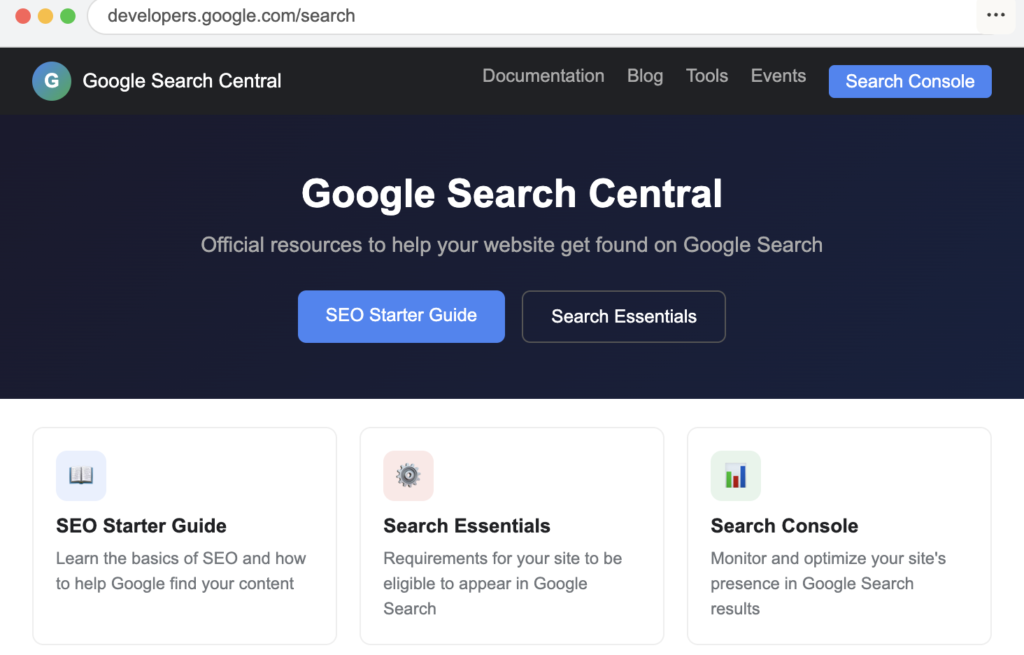
Google’s official SEO documentation lives in one place: Google Search Central, accessible at developers.google.com/search.
This is not a single document. It is a comprehensive library of guides, references, and best practices organized into several sections:
The SEO Starter Guide — The foundational guide for beginners covering the basics of how Google finds, crawls, indexes, and ranks content. Originally published as a PDF in 2008, it was converted to web format and most recently refreshed in 2024 to focus specifically on beginner-level website owners.
Search Essentials — Previously called “Webmaster Guidelines,” this document outlines what Google requires from any website to be eligible to appear in search results. It covers technical requirements, spam policies, and key best practices.
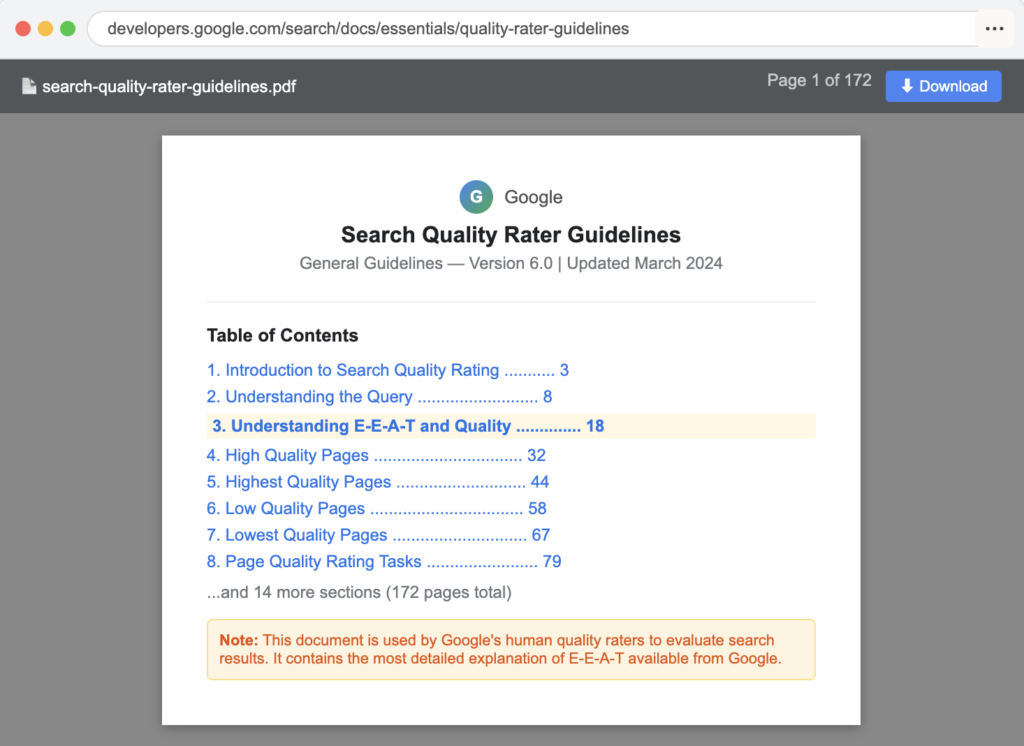
Search Quality Rater Guidelines — A detailed PDF document used by Google’s human quality raters to evaluate search results. This is arguably the most important document for understanding how Google thinks about content quality. It is where E-E-A-T is explained in depth.
How Google Search Works — A technical explanation of the crawling, indexing, and ranking process. Essential reading for anyone doing technical SEO.
Core Web Vitals Documentation — Google’s official guidance on page experience signals including Largest Contentful Paint, Interaction to Next Paint, and Cumulative Layout Shift.
Google SEO PDF — What Still Exists and What Has Changed
This is one of the most searched questions about Google’s SEO documentation — and most answers online are outdated.
Here is the accurate picture in 2026:
The Original PDF — No Longer Officially Available
The original Google SEO Starter Guide PDF that launched in 2008 expanded to 40 pages and was translated into 40 languages. Google officially retired this PDF format when they migrated the content to web-based documentation. If you find a PDF version being shared online, it is an archived copy — not the current official version.
What Replaced It
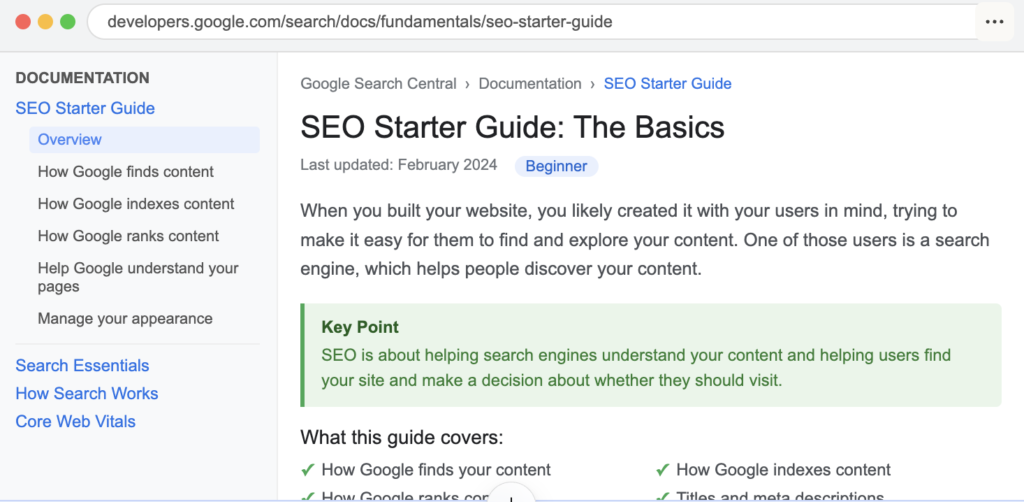
The web-based Google SEO Starter Guide at developers.google.com/search/docs/fundamentals/seo-starter-guide is the current official resource. It is regularly updated — something a static PDF could never be.
The PDF That Still Exists — Search Quality Rater Guidelines
Google’s Search Quality Rater Guidelines is still published as a downloadable PDF. This is a 170+ page document that Google’s human quality raters use to evaluate search results. It contains the most detailed explanation of how Google thinks about content quality, E-E-A-T, page quality ratings, and what constitutes helpful versus harmful content.
This PDF is available directly from Google Search Central and is updated periodically. It is essential reading for any serious SEO professional.
How to Save Any Google Documentation as PDF
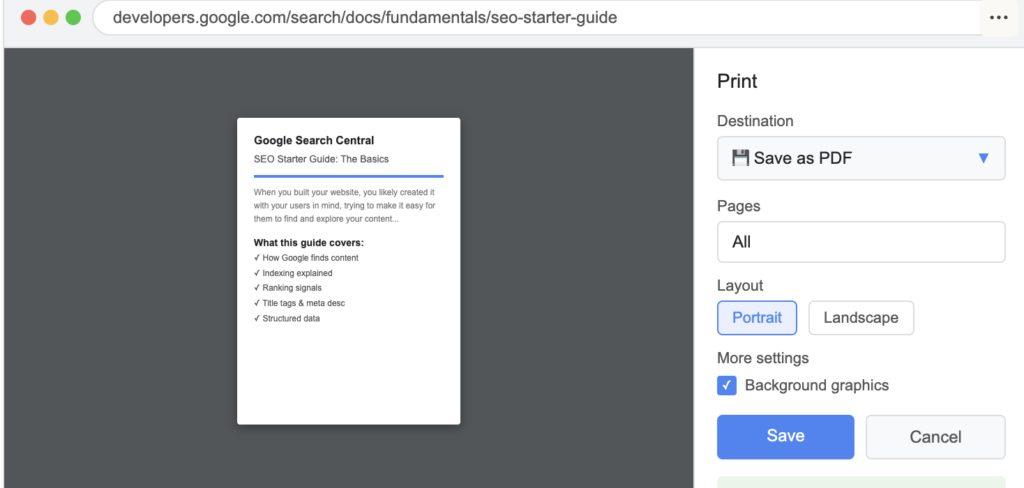
If you want a PDF version of any Google Search Central page for offline reading:
Step 1 — Open the page in Chrome Step 2 — Press Ctrl + P (Windows) or Command + P (Mac) Step 3 — In the destination dropdown, select “Save as PDF” Step 4 — Click Save
This gives you an up-to-date PDF of any documentation page whenever you need it.
The Google SEO Starter Guide — Complete Breakdown
The refreshed 2024 Google SEO Starter Guide focuses on four core areas that Google considers most important for beginners. Understanding these is the foundation of everything else.
How Google Finds Your Content
Google discovers content through crawling — automated programs called Googlebot visit pages by following links from one page to another. If your pages are not linked to from anywhere, Google may never find them.
Key actions Google recommends:
Submit a sitemap through Google Search Console — this tells Google about all the pages on your site that you want indexed. For most websites using WordPress, plugins like Yoast SEO or Rank Math generate and submit sitemaps automatically.
Ensure your important pages are reachable through standard HTML links — JavaScript-based navigation that search engine bots cannot follow will prevent discovery of linked pages.
Check your robots.txt file — this file tells search engines which pages not to crawl. Incorrectly configured robots.txt files are one of the most common causes of pages disappearing from search results.
How Google Indexes Your Content
Indexing is the process of Google understanding, processing, and storing your content in its database. Being crawled does not guarantee being indexed — Google evaluates content quality and decides what is worth storing.
What Google’s documentation says affects indexing:
Unique, valuable content gets indexed reliably. Thin, duplicate, or low-quality content may be crawled but not indexed — or indexed and then removed over time.
Page canonicalization matters — if multiple URLs serve the same or similar content, Google needs a canonical tag to understand which version to index and rank.
Mobile-friendliness is now a baseline requirement — Google uses mobile-first indexing, meaning it evaluates the mobile version of your page as the primary version.
How Google Ranks Your Content
This is the section most people care about most — and where Google’s documentation is deliberately less specific than SEO professionals would like. Google uses hundreds of signals to determine ranking. However, the documentation is clear about several confirmed factors:
Relevance — Does the page content match what the searcher is looking for? Google evaluates this through semantic understanding of content, not just keyword matching.
Quality — Does the content demonstrate genuine expertise, experience, and trustworthiness? This is evaluated through E-E-A-T signals.
Usability — Does the page load fast, work on mobile, and provide a good user experience? Core Web Vitals measure this.
Context — The searcher’s location, search history, and device type all affect which results they see.
How to Help Google Understand Your Content
Google’s documentation specifically recommends several on-page practices:
Use descriptive, keyword-relevant page titles — the title tag remains one of the strongest on-page signals. Write titles that accurately describe the page content and match what users are searching for.
Write clear, descriptive meta descriptions — while not a direct ranking factor, meta descriptions significantly affect click-through rates from search results, which influences the traffic your page receives.
Use heading tags to structure content — H1 for the main topic, H2 for main sections, H3 for subsections. Google uses heading structure to understand content hierarchy and topic organization.
Use descriptive alt text for images — Google cannot see images the way humans do. Alt text helps Google understand image content and improves accessibility for visually impaired users.
E-E-A-T: The Most Important Framework in Google’s Documentation
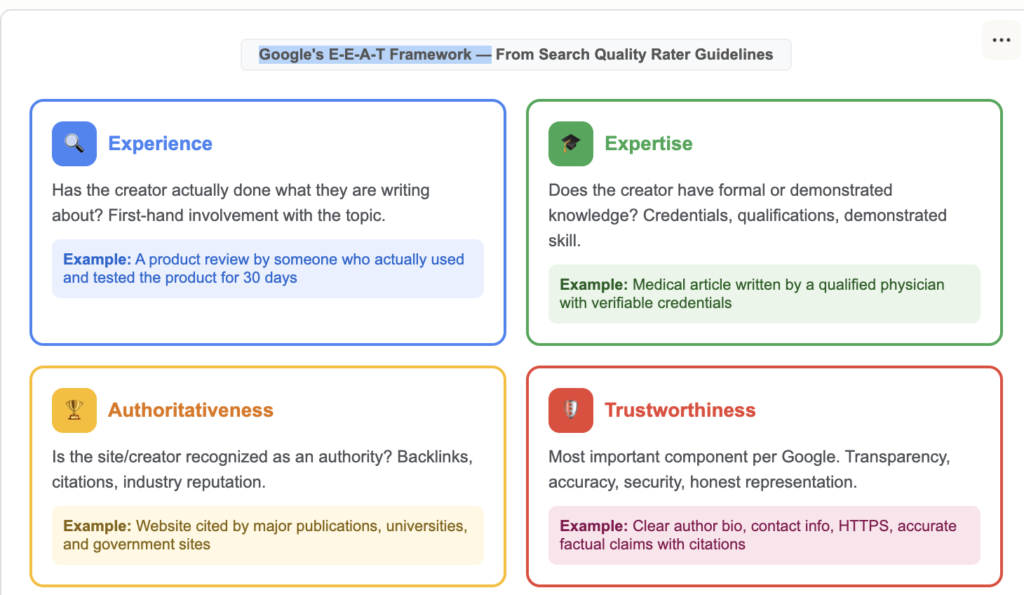
If there is one concept from Google’s official documentation that has transformed how SEO works in recent years, it is E-E-A-T — Experience, Expertise, Authoritativeness, and Trustworthiness.
Originally E-A-T (without the first E), Google added Experience to the framework in December 2022, recognizing that first-hand experience with a topic is as valuable as formal expertise.
What Each Component Means
Experience — Has the content creator actually done what they are writing about? A product review written by someone who has genuinely used the product demonstrates experience. A financial article written by someone who has personally invested demonstrates experience. Google rewards content that shows real, first-hand involvement with the topic.
Expertise — Does the creator have formal or demonstrated knowledge of the subject? For medical topics, this means content written or reviewed by qualified healthcare professionals. For legal topics, this means licensed attorneys. For technical topics, it means demonstrable technical knowledge shown through accurate, detailed content.
Authoritativeness — Is the website and creator recognized as an authority in their field? This is largely built through backlinks from other authoritative sources, mentions in reputable publications, and a consistent track record of producing accurate, reliable content.
Trustworthiness — This is the most important component according to Google’s own documentation. It encompasses all of the above plus additional trust signals: transparent authorship information, accurate contact details, honest product or service representations, secure HTTPS connection, and a clear editorial process.
How to Improve E-E-A-T on Your Website
Add detailed author bios to every piece of content — include credentials, experience, and links to professional profiles. Google’s quality raters specifically look for author information when evaluating content.
Include first-hand experience in your content — case studies, real examples, original data, personal anecdotes that demonstrate you have actually done what you are writing about.
Get cited by authoritative sources — backlinks from high-authority domains in your industry are the strongest external signal of authoritativeness.
Make your website transparent — clear About page, contact information, editorial policies, and correction procedures all contribute to trust signals.
Keep content accurate and updated — outdated information, especially on topics that change frequently, is a trust signal problem. Review and update your most important pages regularly.
Google’s Helpful Content System — What It Means for Your Content Strategy
In 2022 Google launched the Helpful Content System, which became one of the most significant algorithm updates in years. It was designed specifically to identify and demote content created primarily for search engines rather than for people.
In 2026 this system is fully integrated into Google’s core ranking algorithm — it is not a separate filter but a continuous evaluation that affects every piece of content on your site.
Google’s documentation describes what people-first content looks like:
It is written for a specific audience with genuine needs — not for a hypothetical keyword searcher. The creator has demonstrated experience with the topic. The content provides complete, satisfying answers rather than sending users elsewhere to find what they actually need. The page accurately represents what users will find when they click.
What the Helpful Content System targets:
Content that summarizes what others have said without adding original value. Content that covers topics only because they have search volume rather than because the site has genuine expertise. Content that uses SEO techniques as a substitute for actual value. Content that leaves readers needing to search again to find a complete answer.
The practical implication for your content strategy is straightforward: every article, page, or piece of content on your site should exist because you have something genuinely valuable to say about the topic — not because a keyword research tool told you it had low competition.
Google’s Official Guidance on Technical SEO
Beyond content quality, Google’s documentation provides specific technical guidance that every website owner should follow.
Core Web Vitals — Google’s Page Experience Signals
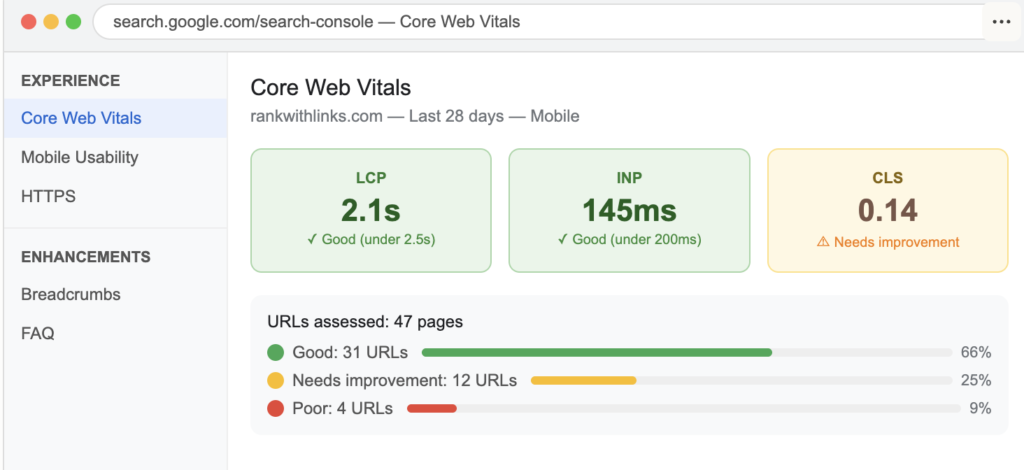
Core Web Vitals are a set of specific metrics that Google uses to evaluate user experience. They are confirmed ranking factors, meaning they can directly affect where your pages appear in search results.
The three Core Web Vitals in 2026 are:
Largest Contentful Paint (LCP) — Measures loading performance. Specifically, how long it takes for the largest visible content element on the page to load. Google’s target is under 2.5 seconds. Pages that load the main content slowly frustrate users and signal poor page experience.
Interaction to Next Paint (INP) — Replaced First Input Delay in 2024. Measures responsiveness — how quickly the page responds when a user clicks, taps, or types. Google’s target is under 200 milliseconds.
Cumulative Layout Shift (CLS) — Measures visual stability. Have you ever been reading a page and had the text suddenly jump because an image or ad loaded? CLS measures how much of this unexpected movement happens. Google’s target is under 0.1.
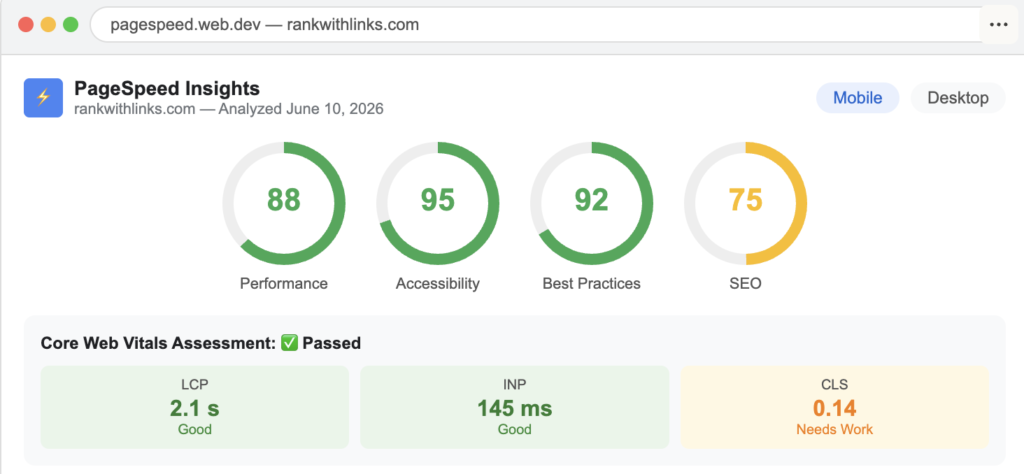
You can check your Core Web Vitals for free in Google Search Console under the Experience section, or using Google’s PageSpeed Insights tool.
Structured Data and Schema Markup
Google’s documentation strongly encourages the use of structured data — standardized code that helps Google understand the content of your pages more precisely. Structured data can also enable rich results in search — enhanced listings that display ratings, prices, FAQs, and other information directly in search results.
Google supports structured data for dozens of content types including articles, products, recipes, events, FAQs, how-to guides, and local businesses.
For most WordPress sites, plugins like Yoast SEO, Rank Math, or Schema Pro handle structured data implementation without requiring any coding knowledge.
Mobile-First Indexing
Google now uses the mobile version of your website as the primary version for indexing and ranking — even for desktop searches. This means:
Your mobile site must contain the same content as your desktop site. Images on mobile must have the same alt text as on desktop. Structured data must be present on both versions. Robots.txt must not block Googlebot-smartphone.
What Google’s Documentation Says About Links
Link building is one of the most discussed topics in SEO — and one where Google’s official guidance is sometimes misunderstood.
Google’s documentation confirms that links remain an important ranking signal. Pages with more high-quality backlinks from relevant, authoritative sources tend to rank higher for competitive queries.
However, Google is equally clear about what constitutes a link scheme — and the penalties for participating in one. Buying links, exchanging links in bulk, and using automated programs to create links are all explicitly listed as violations of Google’s spam policies.
What Google considers legitimate link acquisition:
Creating genuinely useful content that other websites naturally want to reference and link to. Building relationships with relevant websites in your industry. Getting listed in legitimate directories and resource pages. Earning press coverage and mentions through newsworthy activity.
Google’s documentation specifically recommends using the rel=”nofollow” or rel=”sponsored” attribute on paid or sponsored links — including affiliate links — to avoid passing link equity in ways that violate their guidelines.
Comparison Table: Google’s Official SEO Resources
| Resource | Format | Level | Best For | URL |
|---|---|---|---|---|
| SEO Starter Guide | Web (HTML) | Beginner | New website owners | developers.google.com/search/docs/fundamentals/seo-starter-guide |
| Search Essentials | Web (HTML) | All levels | Understanding requirements | developers.google.com/search/docs/essentials |
| Quality Rater Guidelines | PDF Download | Advanced | Content strategy, E-E-A-T | developers.google.com/search/docs/essentials/quality-rater-guidelines |
| How Google Search Works | Web (HTML) | Intermediate | Technical understanding | developers.google.com/search/docs/fundamentals/how-search-works |
| Core Web Vitals | Web (HTML) | Intermediate | Page experience optimization | developers.google.com/search/docs/appearance/core-web-vitals |
| Structured Data Docs | Web (HTML) | Advanced | Schema markup implementation | developers.google.com/search/docs/appearance/structured-data |
| Search Central Blog | Web (HTML) | All levels | Algorithm updates, news | developers.google.com/search/blog |
Common Mistakes People Make When Reading Google’s SEO Documentation
Mistake 1: Reading old PDF versions being shared online
Many websites share archived copies of the original Google SEO PDF from 2008-2017. This content is significantly outdated — it predates E-E-A-T, Core Web Vitals, mobile-first indexing, the Helpful Content System, and AI Overviews. Always go directly to developers.google.com/search for current guidance.
Mistake 2: Ignoring the Search Quality Rater Guidelines
Most beginners read the SEO Starter Guide and stop there. The Search Quality Rater Guidelines PDF is 170+ pages and contains far more nuanced guidance about how Google evaluates content quality. It is the closest thing to a detailed rubric for what Google actually wants.
Mistake 3: Treating documentation as a checklist rather than a philosophy
Google’s documentation describes principles, not a checklist. “Create helpful content” is not a box to tick — it is a content philosophy to adopt. SEO professionals who read the documentation looking for tactical shortcuts miss the point entirely.
Mistake 4: Not checking for updates
Google updates its documentation regularly. The SEO Starter Guide was significantly refreshed in 2024. The Quality Rater Guidelines are updated multiple times per year. Set a reminder to review key documentation pages every quarter.
Mistake 5: Applying outdated interpretations from third-party sources
When Google’s documentation is interpreted by bloggers, the nuance is often lost. For critical decisions about your website, always verify against the primary source rather than relying on someone else’s summary — including this one.
Expert Tips for Using Google’s SEO Documentation
Tip 1: Bookmark Google Search Central as your primary SEO reference
Before consulting any third-party SEO blog or course, check what Google’s official documentation says about the topic. The documentation is the ground truth — everything else is interpretation.
Tip 2: Read the Quality Rater Guidelines from start to finish at least once
It takes three to four hours to read completely, but it is the single most valuable investment of time for any SEO professional. The level of detail about what constitutes high-quality versus low-quality content is unmatched in any other resource.
Tip 3: Use Google Search Console as your primary diagnostic tool
Google Search Console is Google’s official tool for monitoring your site’s search performance. It is free, directly connected to Google’s systems, and provides data that no third-party tool can replicate. Every piece of data in GSC comes directly from Google — not estimates or approximations.
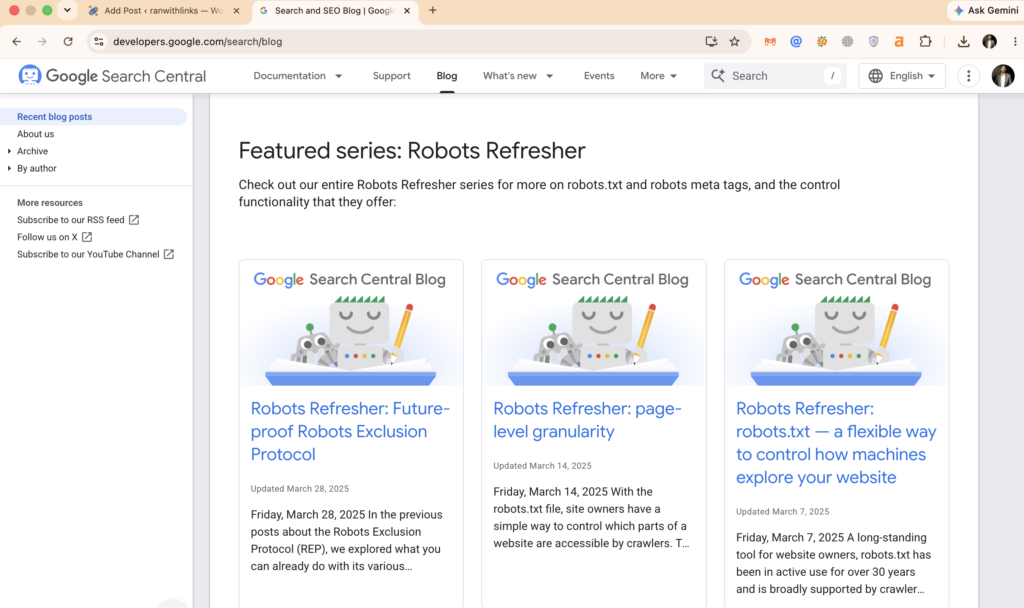
Tip 4: Follow the Google Search Central Blog for algorithm updates
When Google makes significant changes to its algorithm or documentation, they announce it on the Search Central Blog. This is the authoritative source for algorithm update information — not third-party trackers or SEO news sites.
Tip 5: Test Google’s guidance on your own site
Google’s documentation provides principles, but your specific situation may respond differently than average. Implement guidance from the documentation, measure the results in GSC, and adjust based on what you observe. Data from your own site always beats generic advice.
Google SEO in 2026 — What Is New and What Has Changed
Several significant developments have occurred since the last major version of Google’s SEO documentation:
AI Overviews integration — Google’s AI-generated answer boxes now appear for a significant percentage of queries. Google’s documentation now addresses how to optimize for AI Overview inclusion — specifically through structured, factual content with clear citations and proper schema markup.
Helpful Content System fully integrated — What launched as a separate update is now a core component of Google’s ranking algorithm, continuously evaluating every piece of content on your site.
INP replaces FID — Interaction to Next Paint replaced First Input Delay as a Core Web Vital in March 2024, reflecting Google’s focus on overall page responsiveness rather than just first interaction.
Spam policies expanded — Google significantly expanded its spam policies documentation in 2024 to address AI-generated content specifically. The guidance is clear: AI-generated content is not inherently penalized, but content generated primarily to manipulate rankings rather than help users is a spam violation regardless of how it was produced.
Search Essentials simplified — Google consolidated and simplified its essential requirements documentation, making it clearer what is required versus recommended.
FAQ
Q: Where can I download the Google SEO PDF?
A: The original Google SEO Starter Guide PDF has been retired and replaced with a web-based guide at developers.google.com/search/docs/fundamentals/seo-starter-guide. The Google Search Quality Rater Guidelines is still available as a downloadable PDF from Google Search Central. You can also save any Google documentation page as a PDF using your browser’s print-to-PDF function.
Q: Is Google’s SEO Starter Guide still relevant in 2026?
A: Yes — Google refreshed the SEO Starter Guide in 2024, making it current and relevant. However, for advanced SEO work, the Search Quality Rater Guidelines and the full Search Central documentation are more comprehensive resources.
Q: What is the most important thing in Google’s SEO documentation?
A: E-E-A-T — Experience, Expertise, Authoritativeness, and Trustworthiness — is the central framework Google uses to evaluate content quality. Understanding and implementing E-E-A-T principles is the most impactful thing any website owner can do based on Google’s official guidance.
Q: Does Google’s documentation cover AI content?
A: Yes. Google’s updated spam policies explicitly address AI-generated content. The guidance is that AI-generated content is not automatically penalized — what matters is whether content is created to help users or to manipulate rankings. Helpful AI-assisted content is acceptable. Mass-produced AI content designed primarily to rank rather than to help users violates Google’s spam policies.
Q: How often does Google update its SEO documentation?
A: Frequently — some sections are updated multiple times per year. The Search Quality Rater Guidelines are typically updated two to four times annually. The SEO Starter Guide was significantly refreshed in 2024. Follow the Google Search Central Blog for announcements of major documentation updates.
Q: Is Google’s SEO guide enough to rank a website?
A: Google’s documentation tells you what Google values and requires — but applying it effectively requires additional keyword research, competitive analysis, content strategy, and technical implementation skills. The documentation is the foundation; your SEO strategy is built on top of it.
Conclusion: Go to the Source
Every SEO strategy should begin with Google’s own documentation — not a blog post about it, not a YouTube summary, not a paid course interpretation. The source material is free, comprehensive, and updated regularly.
The most effective SEO professionals in 2026 are not the ones who know the most obscure ranking factors. They are the ones who have most thoroughly internalized what Google has publicly stated it values — helpful content, genuine expertise, trustworthy websites, and good user experiences — and who build their entire strategy around delivering exactly that.
Read the SEO Starter Guide. Download and read the Search Quality Rater Guidelines PDF. Set up Google Search Console. Follow the Search Central Blog.
Everything else is secondary.

Fazilat zulfiqar is an SEO specialist at RankWithLinks, focused on improving search rankings through smart link building and optimization.He helps businesses grow organic traffic and build strong online authority.