

Introduction: The Tag That Changed Everything
A few years back I was auditing a client’s website. Good content. Decent backlinks. But traffic was flat for eight months straight.
Within the first ten minutes of the audit, I found the problem. Every single blog post had the same title tag. Literally copy-pasted. The developer had hardcoded the site name into the title template and never tested it.
One afternoon of fixes. Title tags updated, meta descriptions written, a few H1s corrected. Within six weeks, organic traffic jumped 34%.
That’s the power of getting your SEO tags right. It is not glamorous work. It does not trend on Twitter. But it is the foundation that everything else sits on.
This guide covers every SEO tag that matters in 2026 — what it does, how to write it, what not to do, and what most people get wrong.
Key Takeaways
- Title tags are still the single most important on-page SEO element in 2026
- Meta descriptions do not affect rankings directly but they control your click-through rate
- One H1 per page — no exceptions
- Schema markup is no longer optional if you want rich results
- Duplicate tags across pages silently destroy your SEO
- Open Graph tags are essential for social visibility and brand consistency
- A full tag audit every quarter keeps your technical SEO clean
What Are SEO Tags and Why Do They Still Matter in 2026?
SEO tags are HTML elements that provide context to search engines about your page content. They live mostly in the <head> section of your HTML — invisible to casual readers but critically important to crawlers.
Despite years of algorithm updates, these tags still matter because they help Google understand three things:
What your page is about. Tags provide explicit signals that support the implicit signals from your content.
How to display it in search results. Your title and meta description directly control your search listing appearance.
How authoritative and trustworthy your content is. Structured data and semantic tagging contribute to EEAT signals that Google’s Helpful Content System evaluates.
According to Moz, title tags are still considered one of the top five on-page ranking factors. And with Google’s AI Overviews now pulling structured, well-tagged content more aggressively, the cost of ignoring tags in 2026 is higher than ever.
1. Title Tags — Your Most Important SEO Real Estate
The title tag is the clickable blue headline you see in Google search results. It is also what appears in browser tabs and social shares.
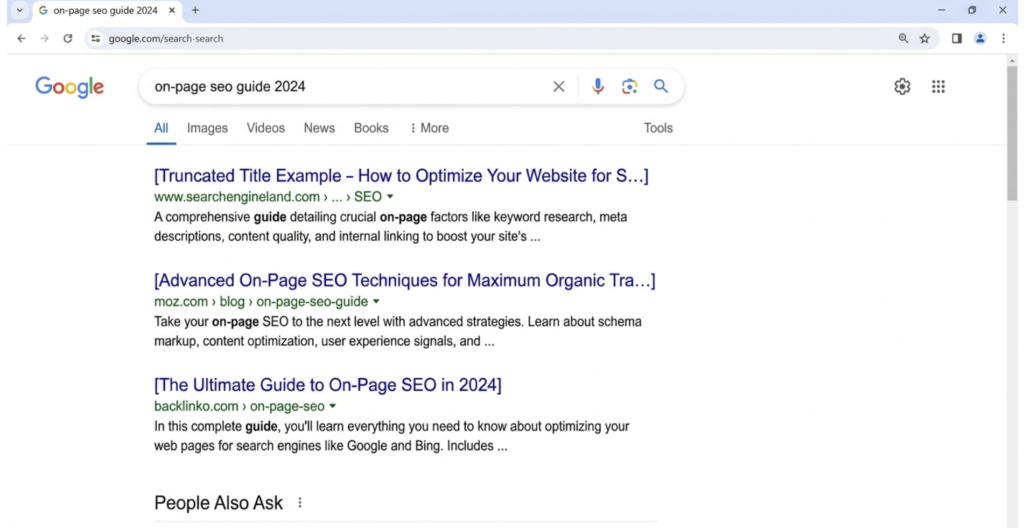
How to Write a Perfect Title TagA
Length: Keep it between 50 and 60 characters. Google truncates titles beyond roughly 600 pixels of display width, which usually falls around 60 characters.
Keyword placement: Put your primary keyword as close to the beginning as possible. Google gives more weight to words that appear early.
Be descriptive, not clever: A title like “Unlock the Secrets of Proposals” tells Google nothing. “Market Led Proposals Roadmap: 7 Stages to Win More Deals” tells Google exactly what the page covers.
Make it unique: Every page on your site needs a different title tag. No exceptions.
Title Tag Comparison Table
| Type | Example | Why It Works or Fails |
|---|---|---|
| Good | SEO Tagging Best Practices: The 2026 Complete Guide | Keyword first, year signals freshness, clear value |
| Bad | Welcome to Our Website | No keyword, no value signal |
| Bad | SEO Tags SEO Tagging Best SEO Practices Guide | Keyword stuffed, looks spammy |
| Good | How to Write Title Tags That Rank in 2026 | Conversational, keyword included, action-oriented |
| Average | Title Tag Guide for SEO | Too vague, no unique value signal |
Expert Tip
In 2026, Google rewrites title tags more aggressively than before — sometimes replacing yours with an H1 or anchor text from your page. The best defense is writing a title that perfectly matches your page content. When your tag and your content align tightly, Google has less reason to override it.
2. Meta Description Tags — Your Organic Ad Copy
The meta description does not directly influence your ranking position. Let that sink in for a second, because it means most people misuse it.
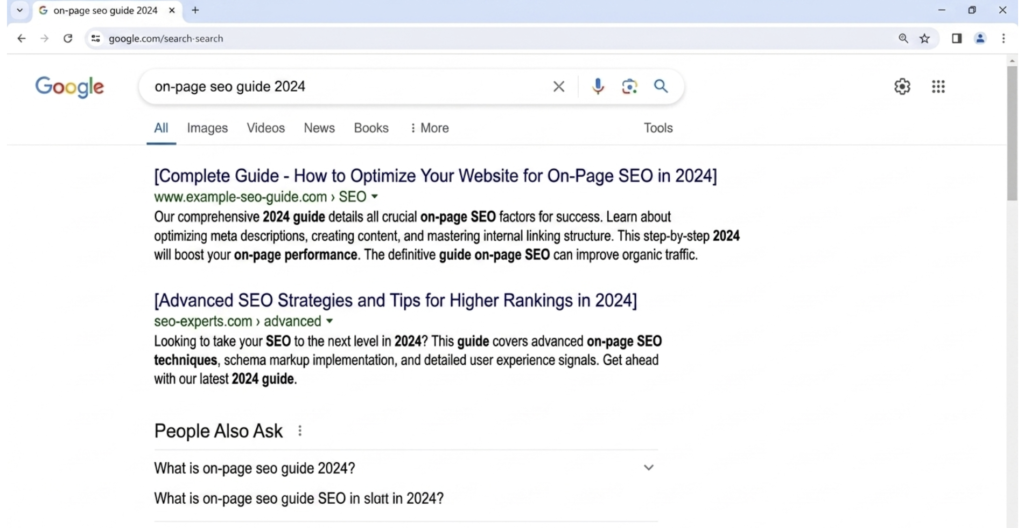
Its job is purely conversion. It is the difference between someone clicking your result and scrolling past it.
Think of it as your organic advertisement. You already earned the ranking. Now close the click.
How to Write a Meta Description That Gets Clicks
Length: 150 to 160 characters. Go over and Google truncates it mid-sentence, which looks unprofessional.
Include your keyword: Google bolds keywords in the description that match the searcher’s query. This makes your listing visually stand out.
Describe the outcome: Tell the reader exactly what they will get. Not what your page is. What they will walk away with.
Add a soft call to action: Phrases like “Learn how,” “Discover,” or “Find out” work well. Do not be pushy but do point them in a direction.
Bad example: “This page is about SEO tagging and best practices for websites and search engines.“
Good example: “Learn how to write title tags, meta descriptions, and schema markup that rank in 2026. Includes examples, a checklist, and expert tips.”
3. Header Tags — Structure That Signals Authority
Header tags (H1 through H6) do two jobs simultaneously. They create a readable structure for your audience and a content hierarchy that Google uses to understand your page.
The Rules of Header Tags
H1 — One per page, always. Your H1 is your page’s title. It should contain your primary keyword and match closely with your title tag. Using multiple H1s confuses Google about your primary topic.
H2 — Main section headings. Use these to divide your content into major topics. They should be descriptive and include secondary keywords where they fit naturally.
H3 — Subsections within H2s. If an H2 section has multiple parts, use H3s to organize them. Do not use H3s before you have an H2.
H4 and beyond — Use sparingly. Deep nesting is rarely necessary. If you are using H4s and H5s regularly, your content structure probably needs rethinking.
Header Hierarchy Example
H1: SEO Tagging Best Practices: The Complete 2026 Guide
  H2: What Are SEO Tags?
  H2: Title Tags
    H3: How to Write a Perfect Title Tag
    H3: Common Title Tag Mistakes
  H2: Meta Description Tags
    H3: Writing Meta Descriptions That Convert
  H2: Schema Markup
    H3: FAQ Schema
    H3: Article Schema
Clean, logical, easy to follow. That is what Google rewards.
4. Image Alt Tags — The SEO Asset Most People Ignore
Every image on your site should have an alt tag. This is not optional — it is an accessibility requirement and an SEO opportunity.
Alt tags tell screen readers and search engines what an image shows. Google cannot see images the way humans do. Alt text is how it understands visual content.
Alt Tag Best Practices
- Describe the image accurately in plain English
- Include a keyword only when it fits naturally in the description
- Keep it under 125 characters
- Do not start with “image of” or “photo of” — Google knows it is an image
- Decorative images (dividers, backgrounds) can use
alt=""to signal they carry no content meaning
Practical example:
You have an infographic showing a 14-day proposal delivery timeline.
Wrong: alt="proposal" Wrong: alt="SEO proposal best practices proposal timeline SEO" Right: alt="14-day proposal delivery timeline showing client touchpoints and follow-up schedule"
5. Canonical Tags — Your Duplicate Content Shield
The canonical tag tells Google which version of a page is the “official” one. Without it, Google may split your ranking signals across multiple URLs that serve the same or similar content.
When You Need a Canonical Tag
- Your site has both HTTP and HTTPS versions
- You have www and non-www versions
- URL parameters create different URLs for the same page (filters, tracking, sorting)
- You have syndicated content published on other sites
- Pagination creates similar content across multiple pages
Example:
html
<link rel="canonical" href="https://rankwithlinks.com/seo-tagging-best-practices/">Every page should have a self-referencing canonical tag — even pages with no duplicate risk. It is a clean signal that tells Google exactly which URL to index and rank.
Canonical vs. 301 Redirect
| Situation | Use Canonical | Use 301 Redirect |
|---|---|---|
| Same content, different URL parameters | Yes | No |
| Old URL permanently replaced by new URL | No | Yes |
| Syndicated content on external site | Yes | No |
| HTTPS consolidation | Yes | Yes (plus canonical) |
| Paginated content consolidation | Yes | No |
6. Meta Robots Tag — Control What Google Indexes
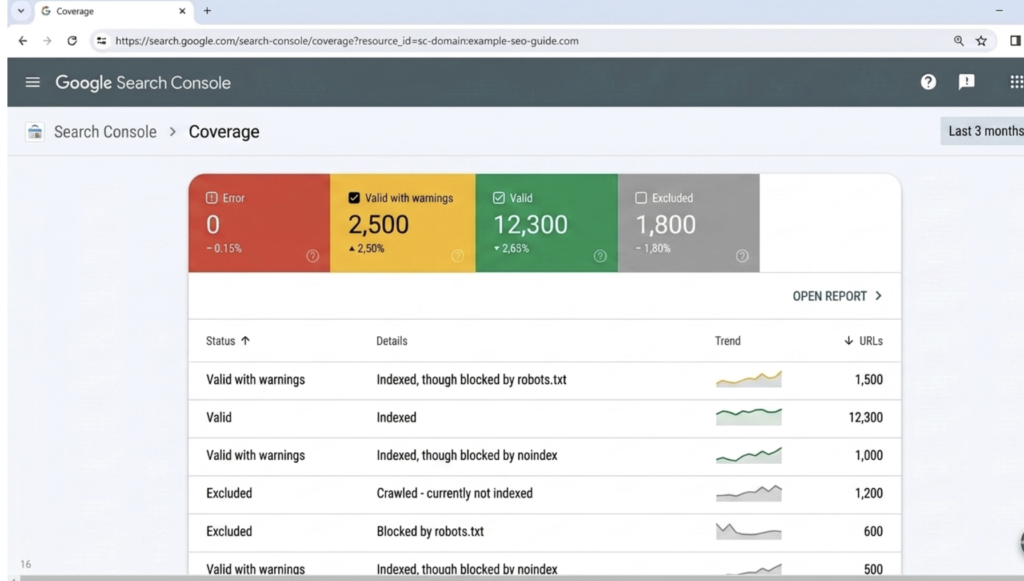
The robots meta tag tells crawlers what they can and cannot do with your page.
html
<meta name="robots" content="index, follow">Common Values and When to Use Them
index, follow — Default. Use this on all pages you want ranked.
noindex, follow — Index the page? No. Follow its links? Yes. Use on thank-you pages, internal search results, and admin pages.
noindex, nofollow — Ignore everything. Use on staging environments and private pages.
noarchive — Prevents Google from showing a cached version of your page. Useful for pages with frequently changing information like pricing.
Common Mistake
A lot of sites accidentally set noindex on important pages during development and forget to remove it before launch. This is one of the most common and damaging SEO mistakes I see. Always audit your robots tags after any site migration or redesign.
7. Open Graph and Twitter Card Tags — Control Your Social Presence
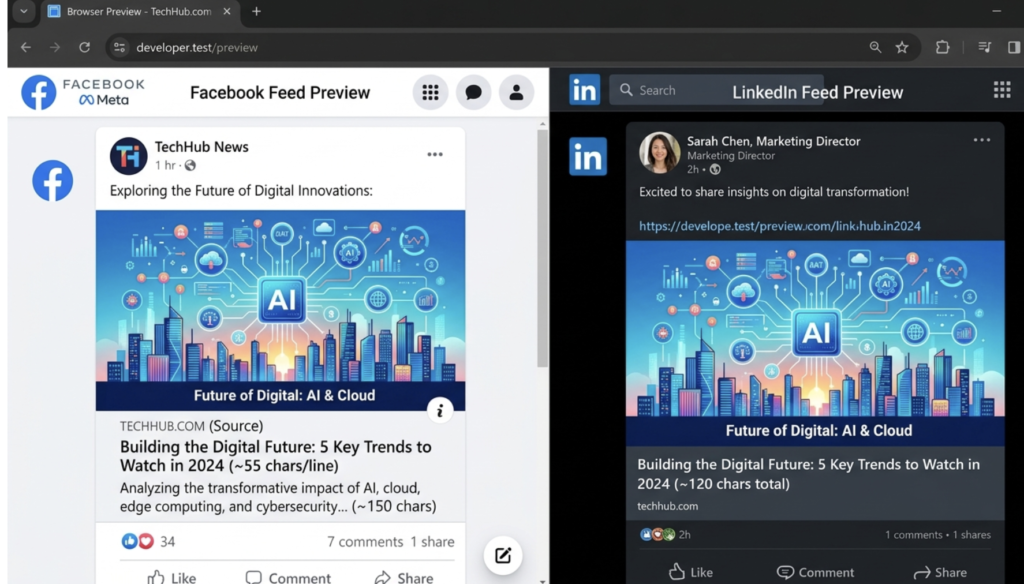
When someone shares your link on LinkedIn, Facebook, or X, Open Graph tags control what appears — the image, title, and description. Without them, social platforms make their own choices, often pulling the wrong image or a random snippet of text.
Essential Open Graph Tags
html
<meta property="og:title" content="SEO Tagging Best Practices: The 2026 Guide">
<meta property="og:description" content="Master every SEO tag with examples, checklists, and expert tips.">
<meta property="og:image" content="https://rankwithlinks.com/images/seo-tags-guide.jpg">
<meta property="og:url" content="https://rankwithlinks.com/seo-tagging-best-practices/">
<meta property="og:type" content="article">
OG Image size: 1200 x 630 pixels. Anything smaller risks being cropped or rejected.
Twitter Card Tags
html
<meta name="twitter:card" content="summary_large_image">
<meta name="twitter:title" content="SEO Tagging Best Practices: The 2026 Guide">
<meta name="twitter:description" content="Everything you need to know about SEO tags in 2026.">
<meta name="twitter:image" content="https://rankwithlinks.com/images/seo-tags-twitter.jpg">
These two sets of tags work independently. A page can have both, and it should.
8. Schema Markup — The Key to Rich Results in 2026
Schema markup is structured data that you add to your page to help Google understand your content at a deeper level. It does not change what visitors see. It changes what Google sees and how it represents your page in search.
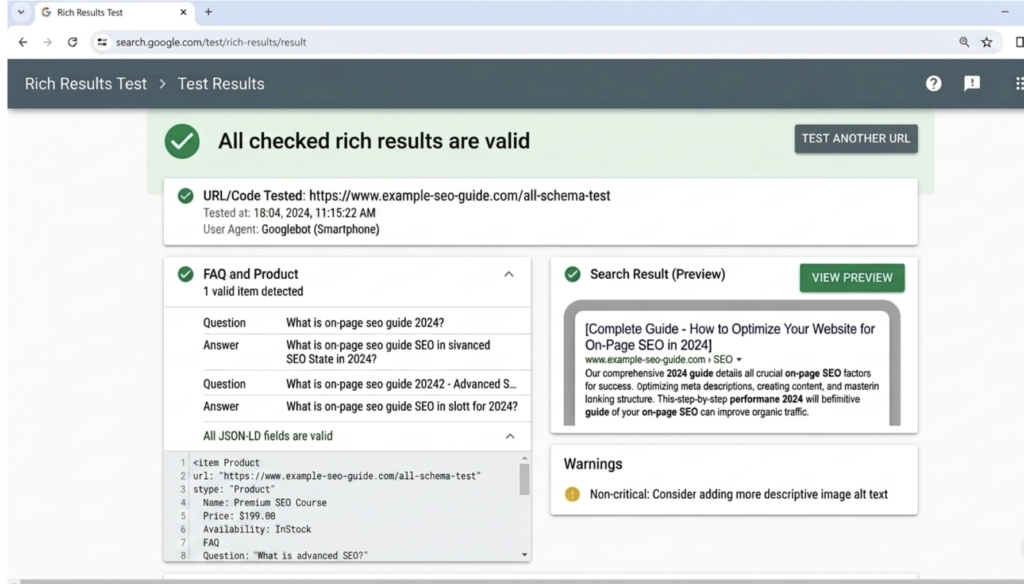
In 2026, schema is one of the most underused advantages in SEO. Most sites skip it entirely because it feels technical. That is exactly why it remains an opportunity.
Schema Types Every Site Should Consider
| Schema Type | Best Use Case | Rich Result Potential |
|---|---|---|
| Article | Blog posts, news, guides | Byline, date in results |
| FAQPage | FAQ sections | Expandable Q&A in SERPs |
| HowTo | Step-by-step guides | Numbered steps in results |
| BreadcrumbList | Navigation paths | Breadcrumbs below title |
| Product | E-commerce pages | Price, rating, availability |
| LocalBusiness | Local service pages | Knowledge panel |
| Review / AggregateRating | Reviews and roundups | Star ratings in results |
| VideoObject | Pages with video | Video thumbnail in SERPs |
FAQ Schema Example
json
{
  "@context": "https://schema.org",
  "@type": "FAQPage",
  "mainEntity": [
    {
      "@type": "Question",
      "name": "What are SEO tagging best practices?",
      "acceptedAnswer": {
        "@type": "Answer",
        "text": "SEO tagging best practices include writing unique title tags under 60 characters, compelling meta descriptions under 160 characters, using one H1 per page, adding descriptive alt text to images, implementing canonical tags, and adding schema markup to qualify for rich results."
      }
    }
  ]
}
Add this in a <script type="application/ld+json"> block in your page head or body.
9. Hreflang Tags — For International and Multilingual Sites
If your site targets multiple countries or languages, hreflang tags are essential. They tell Google which language and regional version of your page to show to which audience.
html
<link rel="alternate" hreflang="en-us" href="https://rankwithlinks.com/seo-tagging/">
<link rel="alternate" hreflang="en-gb" href="https://rankwithlinks.com/uk/seo-tagging/">
<link rel="alternate" hreflang="fr" href="https://rankwithlinks.com/fr/seo-tagging/">
<link rel="alternate" hreflang="x-default" href="https://rankwithlinks.com/seo-tagging/">
Always include the x-default tag — it tells Google which page to show when no other language matches the user’s preference.
Pros and Cons of Manual vs. Plugin-Based Tag Management
| Factor | Manual Tag Management | Plugin-Based (Yoast, RankMath) |
|---|---|---|
| Control | Full control over every tag | Dependent on plugin logic |
| Speed | Slower — requires dev work | Fast and accessible to non-developers |
| Accuracy | Exactly what you write | Can produce generic or templated output |
| Schema support | Custom and precise | Limited to plugin templates |
| Best for | Developers, large enterprises | Bloggers, small business sites |
| Risk | Human error if poorly managed | Plugin bugs can affect site-wide tags |
Common SEO Tagging Mistakes to Avoid
Duplicate title tags are the most widespread problem I find during audits. Even one shared title tag is a problem. At scale it is a disaster.
Missing canonical tags on paginated content or parameter-heavy URLs can cause Google to split your ranking power across dozens of URLs instead of concentrating it on one.
Keyword stuffed alt text looks like spam to Google and damages your image SEO instead of helping it.
Forgetting Open Graph on new pages means every time someone shares that page on social media, it looks broken — no image, no proper title, no description.
Leaving noindex on after launch is more common than it should be. Always run a post-launch crawl to confirm your important pages are set to index.
Writing meta descriptions over 160 characters and having them truncated mid-sentence, making your listing look incomplete in search results.
Expert Tips for 2026
Tip 1: Align your title tag and H1, but do not make them identical. Your title tag is optimized for search click-through. Your H1 is for readers already on your page. They should be closely related but serve different purposes.
Tip 2: Test your tags with Google’s Rich Results Test tool before publishing. Catch schema errors before Google does.
Tip 3: Use dynamic title tag templates carefully. For sites with hundreds of pages, templates like [Product Name] — Buy Online | YourBrand work well. But test them on a sample before rolling out site-wide.
Tip 4: Refresh title tags on pages that have dropped in rankings. A fresh angle or updated year signal can revive stagnant pages without rewriting the whole post.
Tip 5: Monitor your title tag rewrites in Google Search Console. If Google is regularly replacing your titles, that is a signal that your tags are misaligned with your actual content.
Full SEO Tag Audit Checklist
- Every page has a unique title tag between 50 and 60 characters
- Every page has a unique meta description between 150 and 160 characters
- Every page has exactly one H1 containing the primary keyword
- All images have descriptive alt tags
- All pages have a self-referencing canonical tag
- Important pages are set to index, follow
- Open Graph tags are present on all indexable pages
- Twitter Card tags are present on all indexable pages
- Schema markup is implemented on blog posts, FAQ sections, and product pages
- Hreflang tags are present if the site is multilingual or international
- No pages accidentally carry a noindex directive
- No pages share duplicate title tags or meta descriptions
FAQ: SEO Tagging Best Practices
Q: What is the most important SEO tag on a page?
The title tag is the most important SEO tag. It directly influences rankings and controls how your page appears in search results. It should be unique, include your primary keyword near the beginning, and stay under 60 characters.
Q: Do meta descriptions affect Google rankings?
No. Meta descriptions do not directly affect rankings. However, they significantly affect click-through rate, which is a behavioral signal that can indirectly influence how Google values your page.
Q: How many H1 tags should a page have?
One. A single H1 per page signals to Google what the primary topic of that page is. Multiple H1 tags dilute this signal and can confuse the crawler about your main keyword focus.
Q: What happens if I do not add a canonical tag?
Without a canonical tag, Google makes its own choice about which URL to treat as the authoritative version of your page. This can split your ranking signals across multiple URLs, reducing the overall strength of your page in search results.
Q: Is schema markup required for SEO in 2026?
Schema is not technically required, but it is highly recommended. Without it, you cannot qualify for rich results like FAQ dropdowns, star ratings, and HowTo steps in search — all of which increase visibility and click-through rate significantly.
Q: How often should I audit my SEO tags?
Audit your tags at minimum once per quarter. Also run an audit after any major site update, CMS migration, or theme change. These events frequently introduce tagging errors that can silently reduce your rankings.
Q: Can I use the same meta description on multiple pages?
No. Each page needs a unique meta description. Duplicate descriptions are a quality signal that can hurt your overall site evaluation, and they miss the opportunity to communicate each page’s specific value.
Conclusion: Tags Are Not Optional — They Are the Foundation
There is a saying I use with every client: “Great content on a badly tagged site is like a great book in a library with no catalog system. It exists. But nobody can find it.”
SEO tags are your catalog system. They are how you communicate the value and purpose of every page to the largest search engine on the planet.
The technical effort involved is low compared to the return. A thorough tag audit on an existing site often produces more ranking improvement per hour of work than almost anything else in SEO.
Start with your title tags. Fix the duplicates. Write proper meta descriptions. Add schema where it fits. Then audit again in 90 days.
You do not need to do it all at once. You just need to start.

Fazilat zulfiqar is an SEO specialist at RankWithLinks, focused on improving search rankings through smart link building and optimization.He helps businesses grow organic traffic and build strong online authority.