
Getting views on YouTube is not just about creating great content. It is about making sure the right people can actually find that content. YouTube is the second largest search engine in the world, and just like Google, it uses a complex algorithm to decide which videos appear at the top of search results.
If your videos are not showing up when people search for your topic, the problem is almost never the quality of your content. It is almost always discoverability. This guide walks you through every proven strategy to make your YouTube videos more searchable and consistently rank higher in results.
Why YouTube Searchability Matters
Every minute, hundreds of hours of video content are uploaded to YouTube. Without proper optimization, even exceptional videos get buried under a flood of competing content.
Searchability determines whether your video appears when someone types a relevant query into the search bar. It affects your suggested video placement, your browse features visibility, and ultimately your channel growth.
Creators who understand YouTube SEO consistently outperform creators with bigger budgets and better equipment simply because their content gets found.
How the YouTube Search Algorithm Works
Before optimizing, you need to understand what YouTube is actually looking for.
YouTube’s algorithm evaluates videos based on two broad categories: relevance and performance.
Relevance is determined by how well your video metadata — title, description, tags, and captions — matches what a viewer is searching for.
Performance is measured by how viewers interact with your video — watch time, click-through rate, likes, comments, shares, and whether viewers return for more.
The algorithm rewards videos that are both relevant to a search query and genuinely engaging to viewers. Optimizing for search without delivering real value will only get you so far. Both elements must work together.
Step-by-Step: How to Make Your YouTube Videos Searchable
1. Start With Keyword Research Before You Film
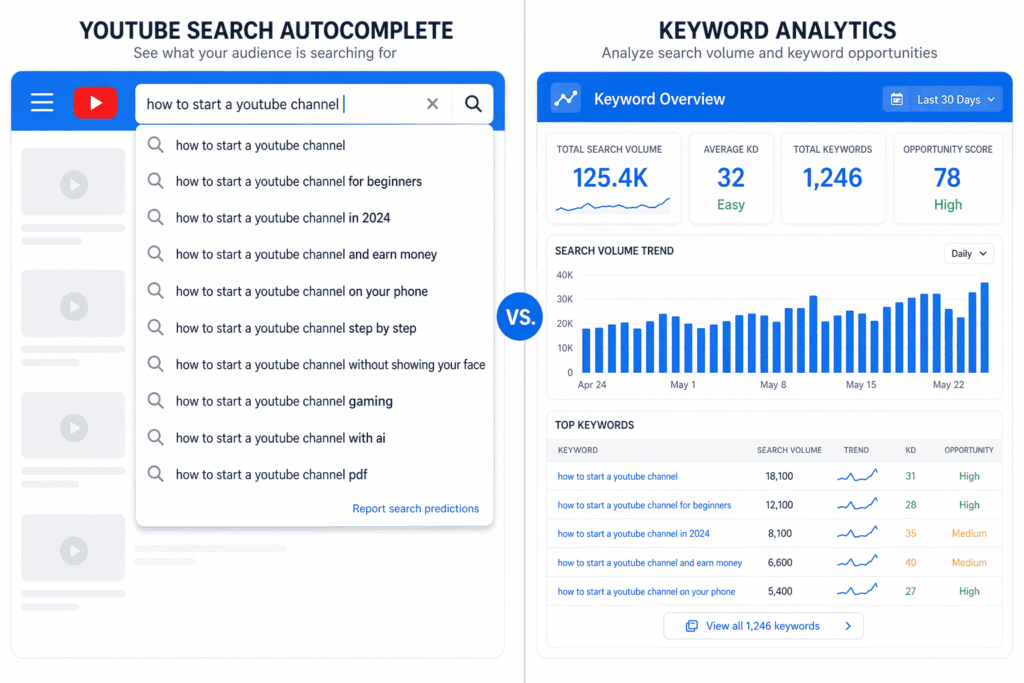
Most creators think about keywords after filming. The ones who rank consistently think about keywords before they even press record.
Keyword research tells you exactly what your target audience is typing into the search bar. It helps you frame your video around language that already has search demand.
Where to find YouTube keywords:
- Type your topic into the YouTube search bar and study the autocomplete suggestions. These are real searches people are making right now.
- Look at the titles of top-ranking videos in your niche and identify repeated phrases.
- Use tools like TubeBuddy or VidIQ to see search volume and competition data for specific keywords.
- Check Google’s autocomplete and “People Also Ask” section, since many Google searches surface YouTube videos.
Focus on finding keywords with solid search volume but manageable competition. Broad terms like “fitness tips” are nearly impossible to rank for as a new creator. Specific phrases like “fitness tips for women over 40 at home” give you a realistic shot.
2. Optimize Your Video Title
Your title is the single most important piece of metadata on your video. It is the first thing both the algorithm and the viewer reads.
A well-optimized title does three things simultaneously: includes your target keyword, communicates clear value, and triggers curiosity or urgency in the viewer.
Title optimization best practices:
- Place your primary keyword as close to the beginning of the title as possible
- Keep titles between 60 and 70 characters to avoid truncation in search results
- Avoid clickbait that does not match the actual content — it damages watch time and trust
- Use numbers, brackets, or power words where they feel natural, not forced
- Write for humans first, algorithm second
A title like “How to Make YouTube Videos Searchable (Step-by-Step SEO Guide)” is clear, keyword-rich, and tells the viewer exactly what they will get.
3. Write a Keyword-Rich Video Description
YouTube cannot watch your video. It reads your description to understand what your content is about. A thin or blank description is a significant missed opportunity.
How to write an effective YouTube description:
- Write at least 200 to 300 words for every video
- Include your primary keyword in the first one to two sentences naturally
- Add secondary and related keywords throughout without stuffing
- Summarize what the video covers so viewers know what to expect
- Include timestamps if your video is longer than five minutes — they improve user experience and searchability
- Add relevant links to related videos or playlists on your channel
The first two to three lines of your description appear before the “Show More” fold. Make those lines count by including your keyword and a compelling hook.
4. Use Tags Strategically
Tags are less powerful than they were five years ago, but they still serve a useful supporting role in helping YouTube understand your video’s context.
Tagging best practices:
- Start with your exact target keyword as the first tag
- Add variations of the keyword including singular, plural, and question-form versions
- Include broader category tags related to your niche
- Add your channel name as a tag so your other videos appear in suggested results
- Aim for 5 to 15 well-chosen tags rather than 30 generic ones
Avoid using misleading tags that do not relate to your content. YouTube penalizes this practice and it will not help your rankings.
5. Create a Custom Thumbnail That Drives Clicks
Thumbnails do not directly affect where YouTube ranks your video, but they have an enormous indirect impact through click-through rate.
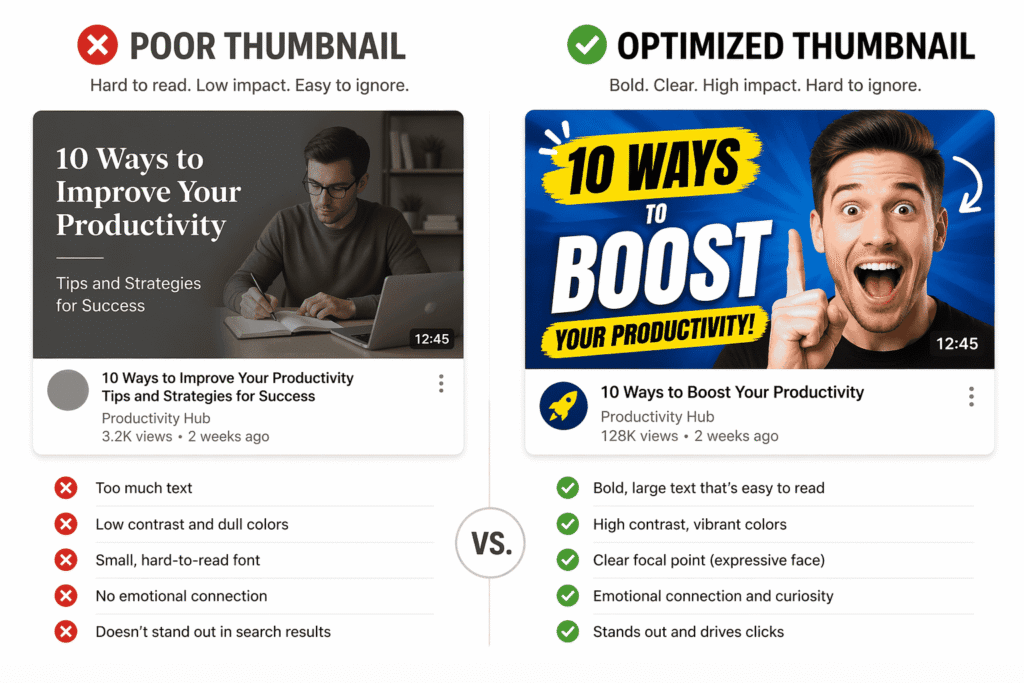
Click-through rate is one of the strongest performance signals YouTube uses to determine how broadly to distribute your video. A video that ranks in fifth place but earns significantly more clicks than the videos above it will often climb in rankings over time.
Thumbnail best practices:
- Use bold, contrasting colors that stand out against YouTube’s white and dark backgrounds
- Include a large, readable text overlay that reinforces or teases the title
- Use a close-up of a human face with clear emotion when relevant — faces drive clicks
- Maintain a consistent visual style so your thumbnails are instantly recognizable
- Design at 1280 x 720 pixels for optimal quality across all devices
Think of your thumbnail as a billboard. It has less than one second to capture attention and earn a click.
6. Add Accurate Closed Captions and Subtitles
YouTube’s auto-generated captions are noticeably imperfect. Uploading your own accurate transcript gives the algorithm a clean, readable version of everything spoken in your video.
This directly improves searchability because YouTube can index the spoken content as text. If you say your target keyword naturally three or four times in your video, an accurate transcript reinforces that relevance signal significantly.
Accurate captions also expand your audience to viewers who watch without sound or speak different languages, which improves watch time and engagement metrics.
7. Choose the Right Category and Use Hashtags
When you upload a video, YouTube asks you to assign it a category. Choose the most accurate category rather than the most popular one. This helps YouTube place your video in the right competitive context.
Hashtags, added in your title or description, appear as clickable links above your video title on mobile. Use two to three highly relevant hashtags per video rather than loading up with ten or fifteen.
Hashtag overuse signals spam to the algorithm. Targeted hashtag use signals relevance.
8. Build and Optimize Your Playlists
Playlists are one of the most underutilized SEO tools on YouTube. A well-organized playlist groups related videos together, keeps viewers on your channel longer, and creates an additional layer of keyword-optimized metadata.
Playlist optimization tips:
- Give every playlist a keyword-focused name and a descriptive summary
- Arrange videos within playlists in a logical sequence to encourage binge-watching
- Embed playlists on your website or blog rather than individual videos to maximize session time
- Create playlists around specific topics, series, or audience segments
Watch time accumulated across a playlist session signals strong channel authority to the algorithm.
9. Publish Consistently and Encourage Engagement
YouTube rewards channels that publish regularly. Consistent uploads signal to the algorithm that your channel is active, which increases how frequently your content gets surfaced to potential viewers.
Equally important is engagement. Comments, likes, shares, and saves all tell YouTube that viewers are responding positively to your content.
Simple ways to encourage engagement:
- Ask a specific, easy-to-answer question at the end of your video
- Reply to every comment in the first 24 hours after publishing — this triggers renewed algorithmic distribution
- Tell viewers explicitly to save the video if they want to return to it
- Pin a comment that starts the conversation and prompts responses from new viewers
Never buy fake engagement. YouTube’s systems detect it quickly, and it actively suppresses your video’s distribution.
10. Promote Your Video in the First 48 Hours
The first 48 hours after uploading are critical. YouTube evaluates early performance signals to decide how broadly to distribute your video.
Share your video immediately across every relevant platform — email lists, social media, community groups, your website, and any niche forums where it adds genuine value.
Early momentum in views, watch time, and engagement tells YouTube your content is worth pushing to a broader audience. A strong launch window can compound into long-term search visibility.
Advanced YouTube SEO Strategies
Optimize for Google Search Too
Many YouTube videos rank on Google’s main search results page, especially for how-to queries, tutorials, and review content. Google often displays a video carousel near the top of results for these searches.
To improve Google visibility, make sure your video title and description match the language people use in Google searches, not just YouTube searches. The two platforms share significant overlap but are not identical.
Create Chapter Markers
Adding timestamps and chapter titles to your video description creates a table of contents that appears directly in search results on both YouTube and Google. This makes your video more useful, increases click-through rate, and allows viewers to jump to the section most relevant to them.
More chapters mean more keyword-rich anchor text indexed by the algorithm.
Analyze Your YouTube Analytics Regularly
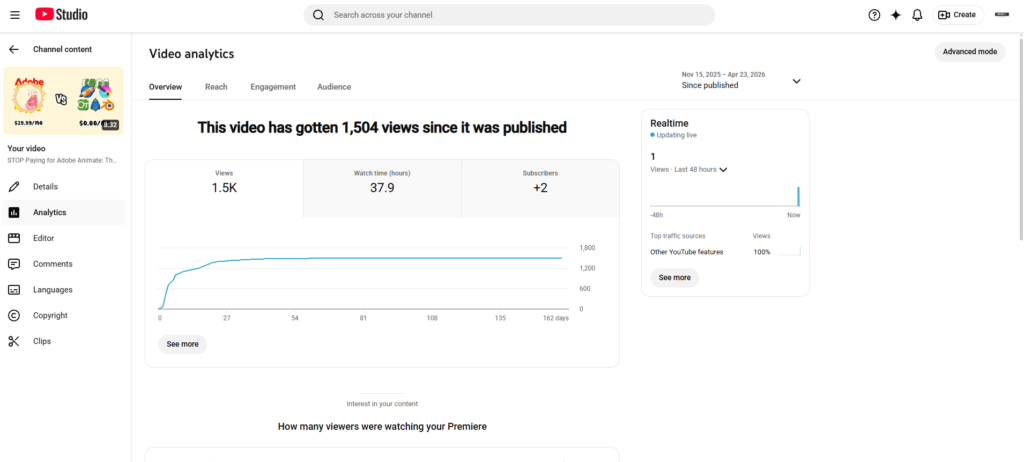
YouTube Studio provides detailed data on where your views are coming from, which search terms are driving traffic, how long viewers are watching, and where they drop off.
Check your traffic source breakdown monthly. If certain search terms are already driving small amounts of traffic to a video, consider creating more content around those specific terms to build topical authority in that area.
Common YouTube SEO Mistakes to Avoid
- Uploading videos without filling in any metadata and hoping the algorithm figures it out
- Writing titles that are clever but contain no searchable keywords
- Using the same generic tags across every video regardless of topic
- Ignoring the description field or copying and pasting the same boilerplate text
- Creating thumbnails that are visually inconsistent or too cluttered to read at a glance
- Publishing sporadically and then going silent for weeks at a time
- Chasing trending topics without any connection to your channel’s core subject matter
How Long Does It Take for YouTube Videos to Rank?
There is no fixed timeline. Some videos find traction within days. Others take three to six months to build momentum through search.
Videos on evergreen topics — content that stays relevant year-round — tend to accumulate views steadily over time and often outperform viral videos in total lifetime views.
Consistency compounds. A channel that publishes well-optimized content every week for a year will typically outperform a channel that uploads sporadically, even if individual videos are higher quality.
Final Thoughts
Making your YouTube videos searchable is a combination of technical optimization and genuine audience understanding. You need to speak the language your audience uses when they search, deliver on the promise your title makes, and give viewers a reason to watch, engage, and return.
The creators who grow consistently on YouTube are not the ones with the best cameras or the biggest personalities. They are the ones who treat every upload as both a creative and a strategic decision — and who understand that great content only creates value when the right people can actually find it.
Start with your next video. Research the keyword before filming, write a strong title, fill out your description completely, and track what happens. Small optimizations done consistently build into significant long-term results.

Abdullah Zulfiqar is Co-founder and Client Success Manager at RankWithLinks, an SEO agency helping businesses grow online. He specializes in client relations and SEO strategy, driving measurable results and maximizing ROI through effective link-building and digital marketing solutions.